Suunto app Forum Suunto Community Forum
    • Recent
    • Tags
    • Popular
    • Users
    • Groups
    • Register
    • Login

    Software update 2.39.20 (2024 Q4)

    Scheduled Pinned Locked Moved Watches
    648 Posts 166 Posters 324.5k Views 175 Watching
    Loading More Posts
    • Oldest to Newest
    • Newest to Oldest
    • Most Votes
    Reply
    • Reply as topic
    Log in to reply
    This topic has been deleted. Only users with topic management privileges can see it.
    • Danny polegD Offline
      Danny poleg Silver Members @GiPFELKiND
      last edited by Danny poleg

      @GiPFELKiND said in Software update 2.39.20 (2024 Q4):

      downgrade

      @GiPFELKiND said in Software update 2.39.20 (2024 Q4):

      downgrade

      A little secret is that I provide technical support for Suunto watches in Israel and I know how to perform the procedure. I don’t want someone private to perform the procedure and potentially damage the warranty on the watch.
      I have several customers who are still suffering from the problem.
      Because of the New Year’s holiday, I rely on the forum for updates.
      @Dimitrios-Kanellopoulos
      Thank you, we will wait for Dimitrios to provide a detailed response with a version number.

      1 Reply Last reply Reply Quote 1
      • pavel.samokhaP Offline
        pavel.samokha @SuuntoZec
        last edited by pavel.samokha

        @SuuntoZec it’s known that the issue also affects some Race S devices and the fix is under development

        Opinions expressed are solely my own and do not express the views or opinions of my employer

        1 Reply Last reply Reply Quote 6
        • Brad_OlwinB Offline
          Brad_Olwin Moderator @SuuntoZec
          last edited by

          @SuuntoZec said in Software update 2.39.20 (2024 Q4):

          @MiniForklift
          I also had issues with charging my Race S, as well as with sleep tracking and OHR, until I downgraded the OS.

          This did not affect my Race S as I have no OHR or sleep tracing problems and did not with testing firmware.

          Vector/T6c/Vertical 2 Ti

          1 Reply Last reply Reply Quote 0
          • K Offline
            kaje_tan @Etienne_72
            last edited by

            @Etienne_72 sorry for late response - Christmas time and as I fixed my case I wasn’t tracking forum.
            You go to Control Panel > Settings > General > About > go all way down and hold few seconds down button > secret menu pops up and you can select ‘Select OTA pkg’ I had three versions on my watch. Good luck!

            Etienne_72E HighlandsH Ecki D.E 3 Replies Last reply Reply Quote 12
            • S Offline
              sergey7 @Chris Stevenson
              last edited by

              @Chris-Stevenson +1 - Having the same problem with HR and sleep tracking! I thought it was just me 🙂 any recommended resolution please? Thank you.

              P 1 Reply Last reply Reply Quote 1
              • Etienne_72E Offline
                Etienne_72 @kaje_tan
                last edited by

                @kaje_tan Thank you! Now everything works fine again and I turned off the automatic update. Will just follow the thread for now and see what happens. 😊

                1 Reply Last reply Reply Quote 1
                • sartoricS sartoric referenced this topic on
                • P Offline
                  pomah86 Bronze Member @sergey7
                  last edited by

                  @sergey7

                  Downgrade the firmware, see 1 post above yours

                  1 Reply Last reply Reply Quote 1
                  • HighlandsH Offline
                    Highlands @kaje_tan
                    last edited by

                    @kaje_tan Does this procedure revert the watch to their factory settings?

                    Brad_OlwinB 1 Reply Last reply Reply Quote 0
                    • Brad_OlwinB Offline
                      Brad_Olwin Moderator @Highlands
                      last edited by

                      @Highlands No it does not. The same as updating firmware.

                      Vector/T6c/Vertical 2 Ti

                      1 Reply Last reply Reply Quote 1
                      • SamuelPS Online
                        SamuelP Silver Members
                        last edited by

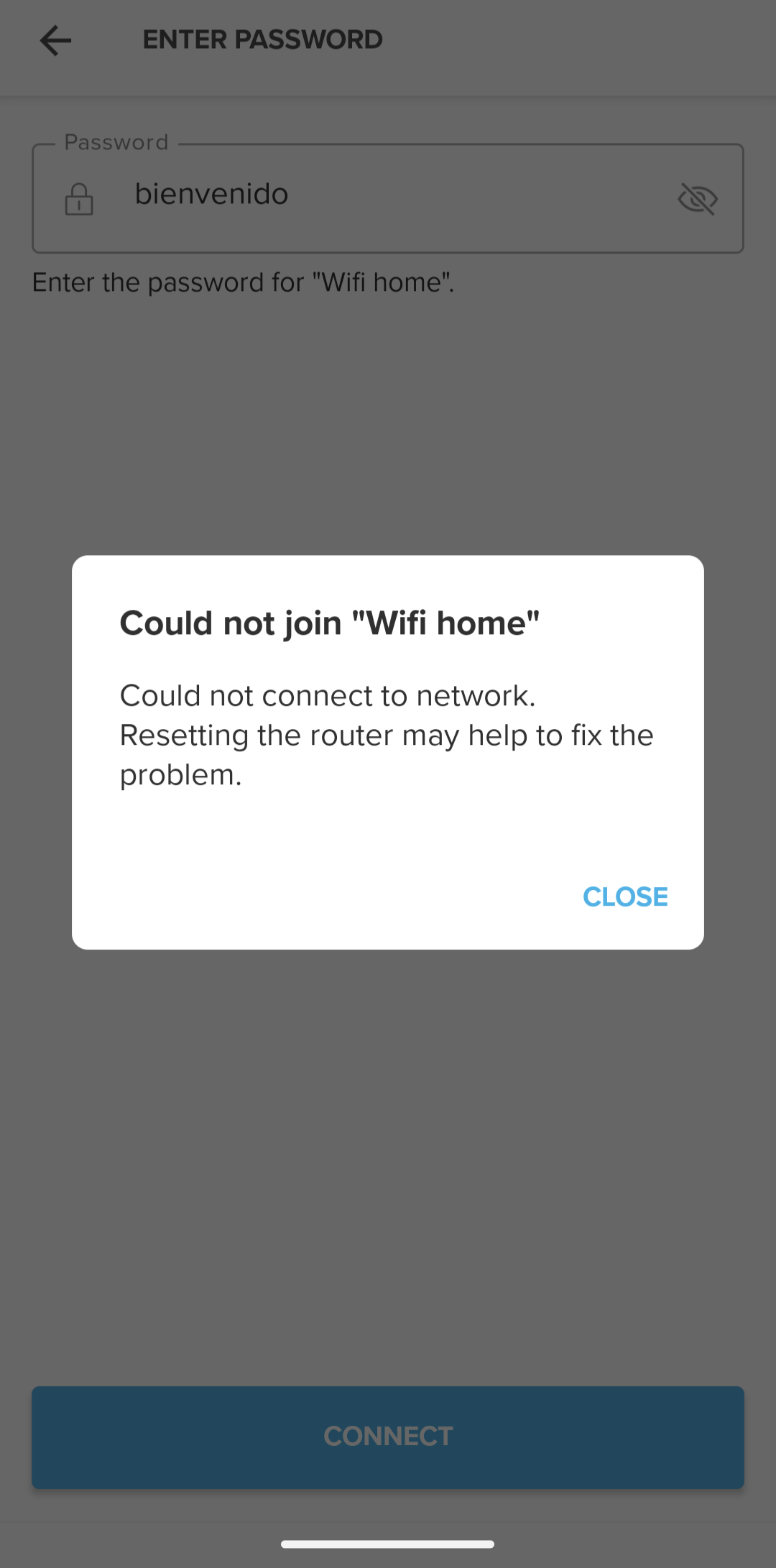
                        Anyone else having problem connecting vertical to wifi since last update? I wanted to download one map today for my trip but i could not connect to my home wifi, the one i have always used without any problems since i bought my vertical in july 2023.
                        I also tried to connect to my phones hotspot but i get the same message in the app.
                        I have searched the forum for this topic and tried everything but it just doesnt connect to any wifi.

                        Have to do my trip without maps now 😞

                        Screenshot_20241228-113641.png

                        Vertical All Black

                        BrunoHB 2 Replies Last reply Reply Quote 3
                        • BrunoHB Offline
                          BrunoH Gold Members @SamuelP
                          last edited by

                          @Samuel-Pirttikangas The same problem here with my Vertical. Map didn’t start downloading so I removed the wifi connection. Now the new connection fails just like yours.

                          Compasses: M-311, A-10, SK-7
                          Diving: Finnlight Navy 90, Vyper
                          Sports: Metron, S7, S9B and Vertical

                          1 Reply Last reply Reply Quote 0
                          • Ecki D.E Offline
                            Ecki D. Bronze Member @kaje_tan
                            last edited by

                            @kaje_tan said in Software update 2.39.20 (2024 Q4):

                            @Etienne_72 sorry for late response - Christmas time and as I fixed my case I wasn’t tracking forum.
                            You go to Control Panel > Settings > General > About > go all way down and hold few seconds down button > secret menu pops up and you can select ‘Select OTA pkg’ I had three versions on my watch. Good luck!

                            Great! Now I have a Snow White Christmas Tree and OHR works as before 🙏
                            Now just snow outside is missing 😉

                            https://www.strava.com/athletes/37982563
                            https://www.instagram.com/macdev

                            1 Reply Last reply Reply Quote 1
                            • BrunoHB Offline
                              BrunoH Gold Members @SamuelP
                              last edited by

                              @Samuel-Pirttikangas I downgraded to the previous SW and the wifi started working immediately.

                              Compasses: M-311, A-10, SK-7
                              Diving: Finnlight Navy 90, Vyper
                              Sports: Metron, S7, S9B and Vertical

                              1 Reply Last reply Reply Quote 4
                              • C Offline
                                claenn @Etienne_72
                                last edited by

                                @Etienne_72

                                https://forum.suunto.com/post/159390

                                1 Reply Last reply Reply Quote 0
                                • inkognitoI Offline
                                  inkognito Platinum Member
                                  last edited by

                                  Is there any reason why the original point of the ruler is no longer updated as you move?

                                  E.g. I use ruler to measure distance from my location (let’s call it point A) to point B. When I move, it still shows the original A-B distance: the starting point (A) is no longer updated. It used to always show distance from the current location in previous firmware…
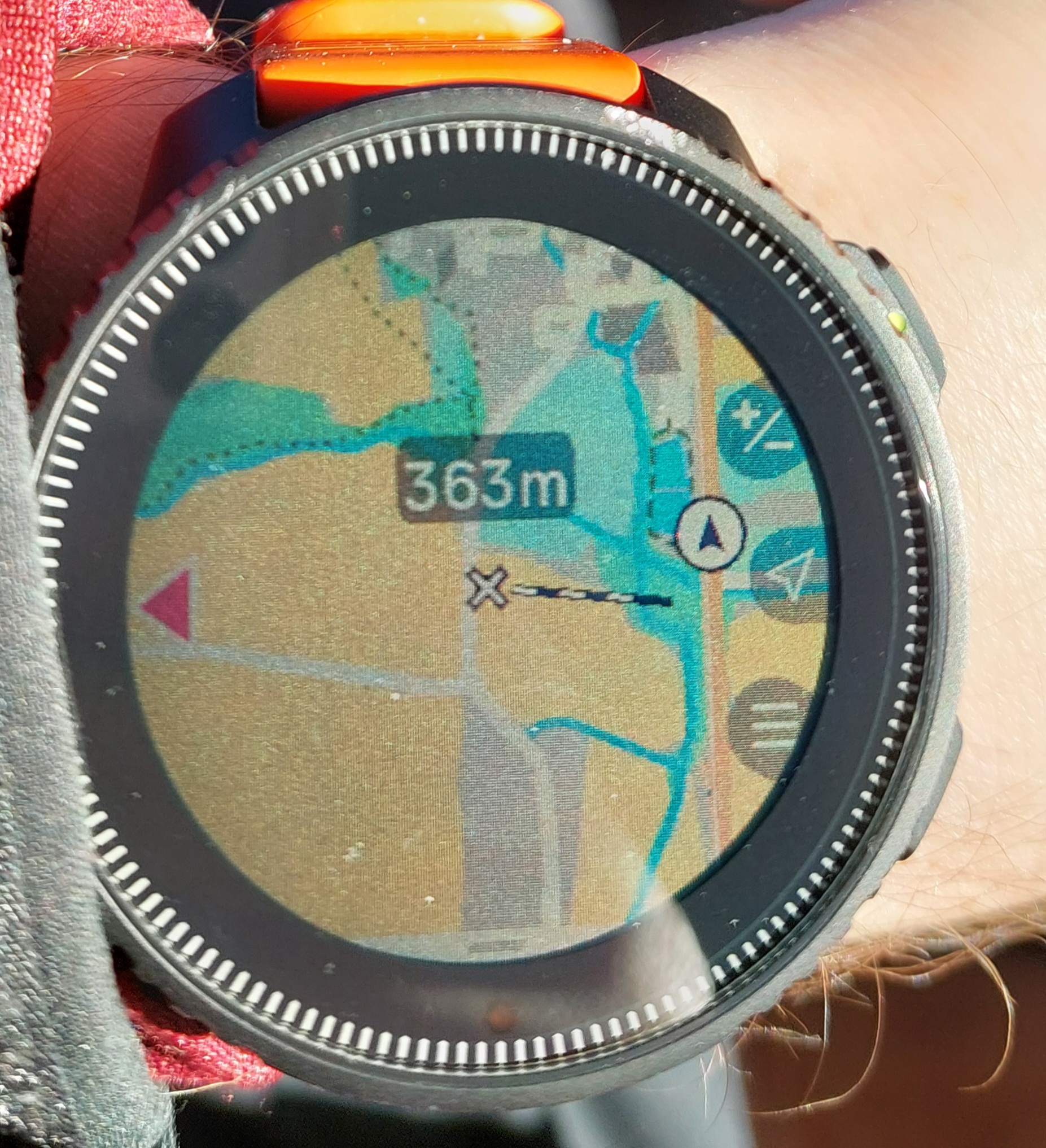
                                  1000032622.jpg

                                  SV: fingers crossed :D
                                  S9 (non-baro): died after 2 months, replaced, holding strong since 03/20
                                  Spartan Trainer: casing broke after 23 months, repaired, lost watertightness 5 months later, died
                                  Despite some pretty bad luck, I still love Suunto!

                                  1 Reply Last reply Reply Quote 0
                                  • VoiGASV Offline
                                    VoiGAS Gold Members
                                    last edited by

                                    To report something positive, the GPS accuracy improved a lot on my Race S. Drift is gone, it shows now when I changed the boardwalk. Also less wobbly. Well done 👍


                                    Race S
                                    Vertical Titanium Solar
                                    Ambit3 Vertical

                                    thanasisT 1 Reply Last reply Reply Quote 2
                                    • thanasisT Offline
                                      thanasis Bronze Member @VoiGAS
                                      last edited by

                                      @VoiGAS said in Software update 2.39.20 (2024 Q4):

                                      To report something positive, the GPS accuracy improved a lot on my Race S. Drift is gone, it shows now when I changed the boardwalk. Also less wobbly. Well done 👍

                                      I can confirm the gps accuracy improvement which is exceptional !
                                      Also the battery in my vertical is now really great . After 12hours of wearing it today and 1.5hours of activities it is 99% … that’s impressive as well

                                      1 Reply Last reply Reply Quote 3
                                      • K Offline
                                        Kramble @sebchastang
                                        last edited by

                                        @sebchastang said in Software update 2.39.20 (2024 Q4):

                                        @BrunoH I have also observed that sometimes even after self-repair the control panel fails again to display correctly.
                                        I still don’t know what causes this broken display.

                                        I ).
                                        @Dimitrios-Kanellopoulos

                                        When I have the control panel bug I solved it repeatedly with this pattern :

                                        1. control panel with long press bottom button shortcut => BUG
                                        2. back to watchface
                                        3. press middle button shortcut (for me it’s chrono)
                                        4. back to watchface
                                        5. control panel with long pressbottom button shortcut => OK, bug is gone

                                        Ambit 3 peak saphir
                                        Spartan Ultra (sold)
                                        S7 graphite copper
                                        S9 peak all black
                                        Vertical titanium green forest
                                        Wings

                                        BrunoHB sebchastangS 2 Replies Last reply Reply Quote 0
                                        • BrunoHB Offline
                                          BrunoH Gold Members @Kramble
                                          last edited by BrunoH

                                          @Kramble thanks but I’d say this workaround is irrelevant since other showstopper bugs emerged. My Vertical lost wifi connectivity and thus couldn’t load new maps. I had to downgrade.

                                          Compasses: M-311, A-10, SK-7
                                          Diving: Finnlight Navy 90, Vyper
                                          Sports: Metron, S7, S9B and Vertical

                                          1 Reply Last reply Reply Quote 0
                                          • sebchastangS Offline
                                            sebchastang Silver Members @Kramble
                                            last edited by

                                            @Kramble Thanks for this new workaround!
                                            Since I switched “control panel” access from bottom button shortcut to pinned widget (middle button short press), I have not seen the broken display anymore. Nevertheless I expect a fix in next firmware update.

                                            Suunto Vertical Titanium Solar
                                            Suunto Traverse

                                            1 Reply Last reply Reply Quote 0
                                            • sartoricS sartoric referenced this topic on

                                            Hello! It looks like you're interested in this conversation, but you don't have an account yet.

                                            Getting fed up of having to scroll through the same posts each visit? When you register for an account, you'll always come back to exactly where you were before, and choose to be notified of new replies (either via email, or push notification). You'll also be able to save bookmarks and upvote posts to show your appreciation to other community members.

                                            With your input, this post could be even better 💗

                                            Register Login
                                            • First post
                                              Last post

                                            Suunto Terms | Privacy Policy