Suunto Software update Q1 (2.53.42)
-
@nathayogi said in Suunto Software update Q1 (2.53.42):
@Squirrel Same for my Race 2 : rebooting the watch causes rebooting pace zones.
Same here, Vertical 2
-
@Dimitrios-Kanellopoulos Hi, thanks for your update.
Does the doing the best mean we will receive any Q1? Bug fixies or even features? I’m asking just because its Q1 time and no info, feedback has been given by Suuno in SuuntoApp. Thanks! -
@Stefano-M64 Took me a while to figure out why it wasn’t working for me, a short explanation in the update notes would have been handy (or seeing your post before I worked it out)
-
Thank you for the update. This is the first trully great update for swimmers.
Drill mode + lap button correction


I have some comments on what could be improved in future updates regarding swimming:
- Do you plan to make the official structured workouts for swimming?
I tested them with a new update. I really like that now we can see in the table what exercise was done at each interval. But because it is not official for swimming still, the table is messy.
For example here:
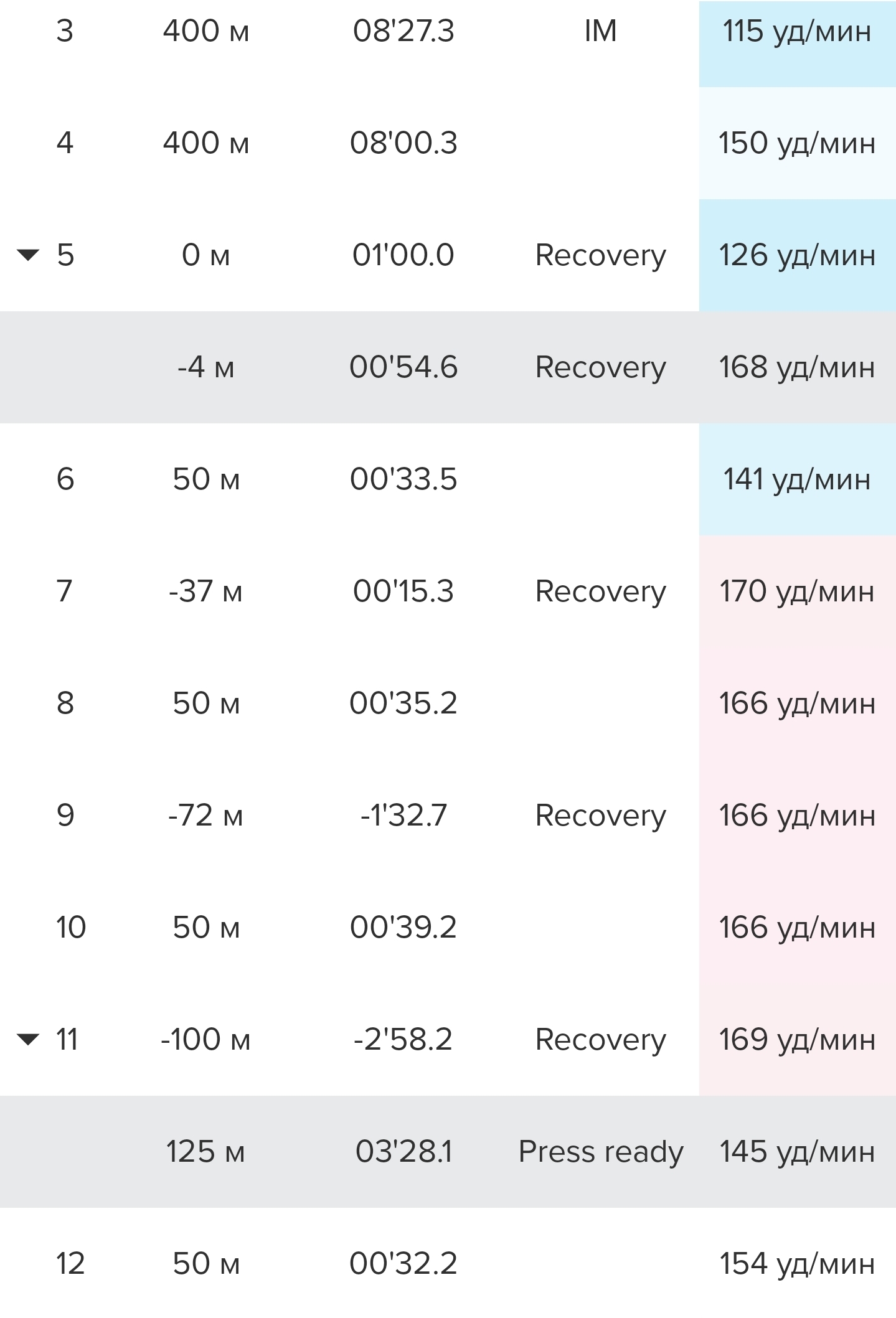
What I actually swam:
400m Medley swimming legs (used a drill mode)
50m butterfly
50m backstroke
50m breaststroke
50m freestyle- I bought a Suunto HR Belt and tested it in water. There is same problem as with Polar Verity Sense, while using in a swimming pool.
Because of physics the Bluetooth signal can’t reach from watch to the HR sensor. Then when both are underwater, the connection is restored. Every time it happens, the watch give a signal (sound or/and vibration). It happens so often, that becomes annoying. Could you, please, add to the sounds settings a separate option for the HR sensor connection notification? So we don’t need to turn off all the sound and vibration during the training.
- It could be nice if we could see a rest time between intervals, like in a “Swim timer” SuuntoPlus app. Also in the Suunto App statistics.
But thanks again for the update. It is really great)
-
Sometimes when I use three SuuntoPlus apps at the same time, my watch shuts down.
-
Hello, using a Suunto Race S. Since the update, I can’t move the map with my finger anymore, it stays locked and follows the route I have selected.
Also the new tooth with up to five data points can’t be touched to cycle through the data points.
I have no touch screen issues, other screens works, just not the map view during a sport mode recording.
Anyone having the same issues? Tried soft restart already.
-
Can please someone explain this phrase:
– We can share heart rate data with a heart rate monitor connected to the watch,
thereby improving connectivity with the heart rate monitorI copied and translated it from Spanish to English from the presentation about the new software.
Since the update I was wondering if it is possible to broadcast HR, which is received from a belt (like Suunto HR belt), from the watch to another device.
As the Suunto belt can only be used with one target device.
-
@Stoke80 yes, you can broadcast the HR, which the watch receives from a belt.
I have used this sometimes during testing to use the HR belt data in two watches (belt connected to Vertical 2, broadcasting to Suunto Run).t6, S6, Elementum Terra, Ambit 3 Sapphire, Spartan Ultra, Traverse Alpha, S7 Graphite LE, S9B Ambassador, S9P Titanium, S9PP Titanium, Vertical All Black, Race Titanium, Race S Titanium Courtney, Run Lime, Race 2, Vertical 2 Titanium, Race 3s
-
Thank you. That is very good news in general.
But for me it means it would not have been necessary to buy a Polar H10 to be able to have the HR on my watch and my Hammerhead :-(.
At least, the quality of the H10 is very good…
-
Vertical 2. Custom alarm.
There’s probably an issue with the alarm after the update. If the alarm is set while automatic DND (Do Not Disturb) is active, it doesn’t go off. Furthermore, the morning report displays an outdated/wrong alarm time – either a later time from before the change (during DND) or an alarm time from another day, e.g., Wednesday. Those times are identical – the Wednesday alarm time matches the pre-edited alarm time from other days.I’ll monitor this for a few more days – I also suspect other data in the morning report is outdated. I’ll have to take photos though, because precise memory fails in the early morning. Anyone else have this problem?
-
@maszop I have tried this exact setup: alarm during auto-DND.
It has worked well and as expected for me.
Maybe try a reboot? Sorry, no other ideas… -
@rawmtb said in Suunto Software update Q1 (2.53.42):
Hello, using a Suunto Race S. Since the update, I can’t move the map with my finger anymore, it stays locked and follows the route I have selected.
Also the new tooth with up to five data points can’t be touched to cycle through the data points.
I have no touch screen issues, other screens works, just not the map view during a sport mode recording.
Anyone having the same issues? Tried soft restart already.
What are your settings in the exercise options for “Touch”?
It needs to be set to “on” or “Map only” to work for this. -
@Egika Here’s what happened: I set the alarm for 7:15 every day initially (Custom alarm: Mo, Tu, Wed, etc.). Then I changed all days except Wed and Sun to 6:15 am (a time during DND). Since then, every morning report shows 7:15. The alarm never goes off – not at 6:15, not at 7:15 – and I also think other data in the report is wrong.
I’ll try reboot/soft reset.
-
@Egika do I set this on the watch directly? Could you point me to these settings?
-
@rawmtb
Before starting an activity:
Select sport mode -> In the pre-start screen scoll to the bottom and select Exercise options -> Scroll down and select “Touch”During the activity:
Press and hold the lower button -> scroll down and select “Touch” -
-
@Egika thanks a lot! This seems like a new option for the Suunto Race S. Problem is now solved and I can navigate the map with touch.
-
@Egika said in Suunto Software update Q1 (2.53.42):
What are your settings in the exercise options for “Touch”?
It needs to be set to “on” or “Map only” to work for this.I honestly wonder why “Map only” isn’t the default after the update, as it is the same as before, I seem to remember. Or at least it is the most sensible option.
Suunto Race S
Garmin Fenix 8 -
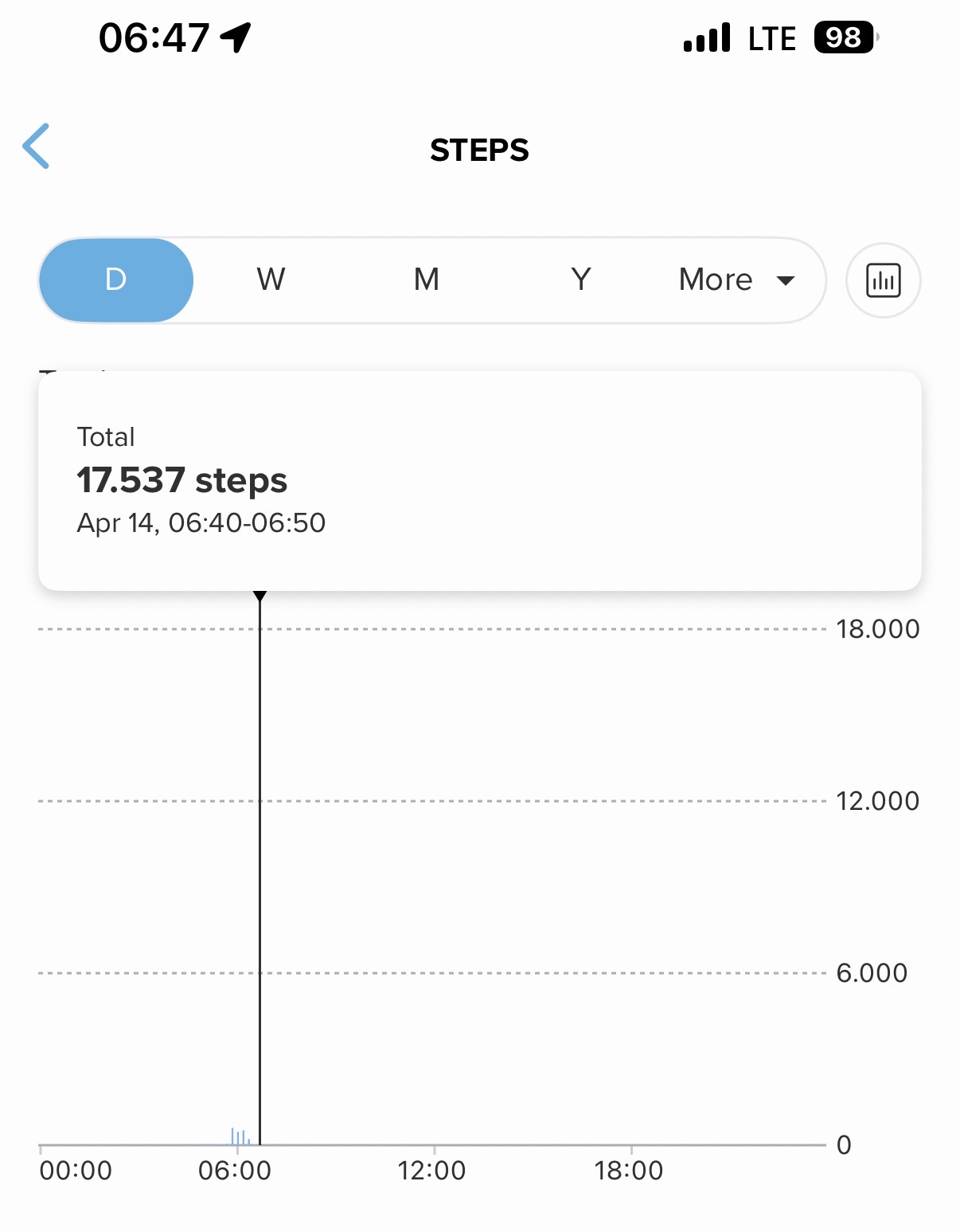
This morning, my Suunto Vertical 2 wasn’t displaying notifications. So I turned the watch off and on again. But then a new problem arose: my step count jumped from 2,000 to 17,537?
-
@2b2bff said in Suunto Software update Q1 (2.53.42):
I honestly wonder why “Map only” isn’t the default after the update, as it is the same as before, I seem to remember. Or at least it is the most sensible option.
I noticed this too! I created a new custom sport mode and found that I couldn’t switch between multiple custom fields at the bottom of the map because the touch was disabled by default. I was wondering why I could choose multiple fields but see only one - at first I thought that was a bug. The “Map only” default makes much more sense.
Suunto: Ambit, Ambit 3 Peak, 9 Baro, Race S, Race Ti, Vertical 2 Ti
Garmin: Forerunner 210, Forerunner 610, Fenix 6X, Fenix 7X Ti









Hello! It looks like you're interested in this conversation, but you don't have an account yet.
Getting fed up of having to scroll through the same posts each visit? When you register for an account, you'll always come back to exactly where you were before, and choose to be notified of new replies (either via email, or push notification). You'll also be able to save bookmarks and upvote posts to show your appreciation to other community members.
With your input, this post could be even better 💗
Register Login