Suunto 2.50.26 – Q4 2025 Release Notes
-
@Александр-Даниленко Yes, of course, I can put myself in your shoes.
-
@2b2bff
 time for downgrade your Firmware
 -
@GiPFELKiND why? The newer algorithm is not really worse, just different. And this time Suunto is under complete control…
Tomorrow I know how it behaves on the bicycle during commute…And I like the other things in the firmware.
I even found an unmentioned fix, that if you go to the options menu as you are about to start an activity and connect an HRM, it will actually start using them right away, visible by the heart with belt symbol. Before it would just show the heart symbol and you would have to go out and back into the activity start to change this… -
said in Suunto 2.50.26 – Q4 2025 Release Notes:
Thanks for update!
I have a weird issue though on SV1 Ti.
The screen brightness wouldn’t go off during time. The screen keeps to be illuminated and a watch doesn’t go to sleep mode. The soft reset didn’t help.
“Stand by” illumination is off.
I tried to set pass code to force a watch to go to sleep mode but it didn’t help. I did one more soft reset and I was asked to enter pass code but a watch kept illuminating a screen.
Something is off here.
@Dimitrios-Kanellopoulos have you seem somewhat similar while testing?
I’ve just downgraded to the previous software and the screen’s backlight is still constantly on. This update has broken something in my watch.
-
@rooldaa have you checked the backlight setting in the control panel?
It is unlikely to impossible that the update “broke” something like this. -
@Egika haha, yes, I missed that! I’ve never controlled it for there. Weird that it’s become ON after the update, though.
But thanks for the advice!
-
@Mads-Hintz-Madsen said in Suunto 2.50.26 – Q4 2025 Release Notes:
Note, that for me on Suunto Race, the installation behaved like a hard reset, i.e., watch needs to be repaired to the app, all zones are reset, sleep tracking is disabled, all paired sensors are removed and HRV range needs to be relearned.
No good for the OP but mine has updated without any fuss
-
@Egika will this problem be fixed in future updates?
What about other general changes in swimming? Like for example those mentioned here:
https://forum.suunto.com/post/129066
All of them are still actual.- for those, who use external HR sensor in swimming (like Polar Verity Sense), now with new connection watches vibrate, which in swimming happens every stoke. I would like to have possibility to turn of notification of sensor connection. Now to deal with that I have to use “Dont disturb mode” in swimming. Before new connection logic was introduced, it worked fine.
Also, it is almost a year since clockwatch screen in swimming doesn’t show the moment when you stopped, the screen is completely useless. It could be nice if Suunto could return this feature - now S+ app SwimTimer doesn’t replace this, because it always has a delaying when starting counting rest time. That screen could show you the moment when you stoped in the past.
Additionally, I already mentioned it before - drill mode in S+ just doesn’t work. It relies on distance calculation by the watches, which count pools only with hands movements. But drills itself doesn’t suppose hands movement - even in your list of drills in that S+ app you have swimming with kickboard, which means that swimmer hold kickboard with his hands, so they doesn’t move.
Suunto Race S
-
I noticed this last night before the release, and it appears it’s still present after the update.
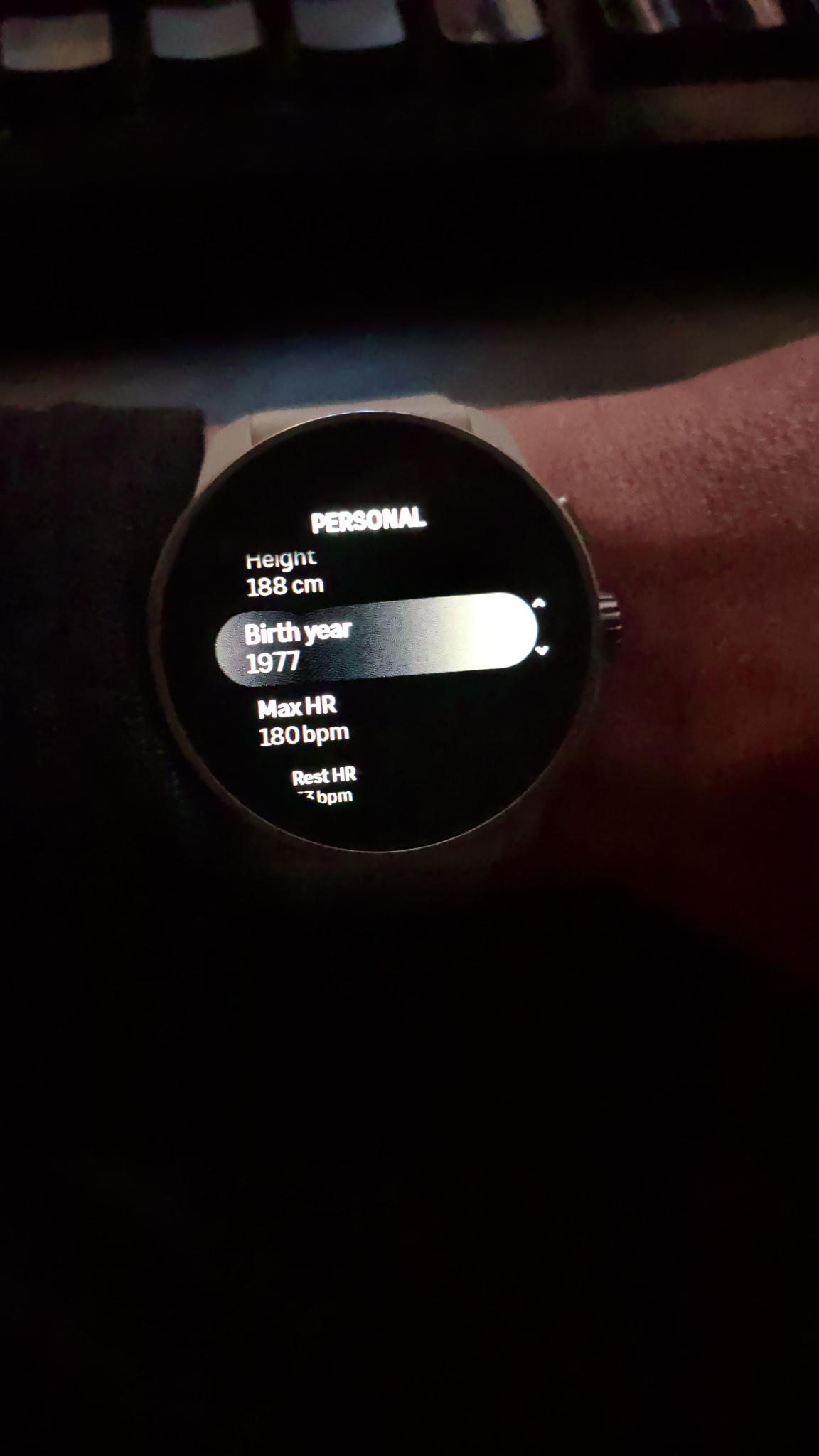
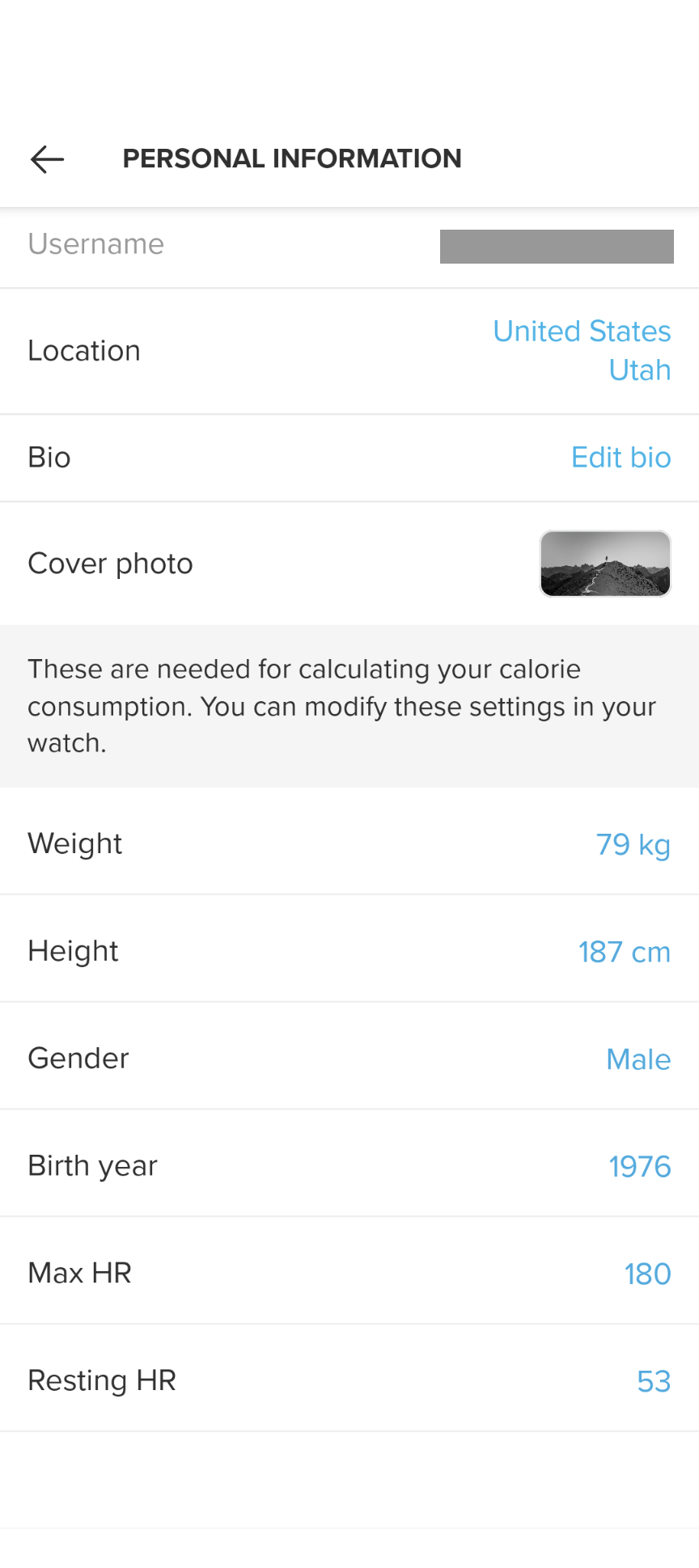
In my watch, I have my birth year correctly set as 1977, but the Suunto app thinks it’s 1976. As far as I can tell, this data is coming from the personal settings in the watch and not something that is set in the app.
Suunto Race S / 9 Baro / Ambit 3 Peak / Observer
Suunto SHRB2 / Polar H10 / Verity Sense / OH1
Stryd Duo / Wind
r/suunto mod -
Can we expect any changes to to inactivity alert settings? In typical old school Suunto fashion, the setting here is very rigid and without any backbone while the rest of the competition has been doing this for years.
-
Hi all,
I don’t know if it’s just me or a general issue, but with my Race S after the updates the Suunto Plus guides (for interval trainings) are usable only from the default sport modes and not from personalized ones…
Are you experiencing the same issue? -
@atoponce Mine has been showing the exact same thing as yours for a while (like probably a few months). I was born in '77, which was right in the watch but a year off in the app. For the longest time, the app was greyed out and unable for me to edit it there. Now, it looks like I can edit that and correct it to '77, including choosing a specific birthday, not just a birth year.
-
@Александр-Даниленко Please keep the relevancy to that post.
About the bug with the workout I can its created and marked for the next hotfix probably release (if not q1).
-
It seems now you can update your weight in Suunto app and it gets updated on the watch.
-
I went for a quick 20 min run and the activity got stuck at “Saving” and the watch rebooted itself. It got saved, but this is new.
-
The structured interval workouts built in the app are no longer available as SuuntoPlus items in the watch when using a personalize sport mode, even though they are listed as a SuuntoPlus guide and synced to the watch. The workouts are listed in the “Basic” sport modes however.
If a date is set for the workout, when starting the activity, the watch asks if you would like to execute the workout. But the workout and any others listed as a SuuntoPlus guide are still missing in the watch.
-
@Inge-Nallsson said in Suunto 2.50.26 – Q4 2025 Release Notes:
Visibility of roads and paths at 500 metres on my Swedish map depend on their width, of course
It depends not on width but on how it is coded on OSM (Open Street Map). I have a very popular multi-use dirt path along power line close to my home that is wide enough for support trucks, and it doesn’t show at 0.2 mile zoom level (that is 320 meters). I’ve just checked it again with the new update, but there is no change. This is is coded as footpath, I believe.
But a similarly wide path in another place is coded as a dirt road, and that does show at lower (more zoomed out) zoom level. You can tell by how it is rendered on the watch map. If it is a dirt road, it is rendered with long dashes like in the picture above. If it is a footpath or sidewalk it is rendered with short dashes and looks almost like a dotted line. The latter disappear at the 500m/0.2mi zoom level.
Suunto: Ambit, Ambit 3 Peak, 9 Baro, Race S, Race Ti, Vertical 2 Ti
Garmin: Forerunner 210, Forerunner 610, Fenix 6X, Fenix 7X Ti -
Update went well on Vertical 1 except for two items. One I am used to, but here they are:
-
Suunto Guides are not available in Custom Sport profiles. Daily workouts created in TP and Intervals are available when I open the profile for a workout, but no guides are present under Suuntoapps. I confirmed I am not crazy by looking at my Race S that has not been updated yet and the guides are all there.
-
And pace. I had to reenter pace. It had erased my pace data.
Suunto Vertical, Race, Race 2, Race S and Run. Rocking the Vertical 2 Titanium at the moment.
Garmin: Fenix 7X, Epix Pro 51mm, Forerunner 265.
Coros: Pace Pro, Apex 4 -
-
@sky-runner OK, thanks for the detailed info. I wrote about the suspected underlying map data observations in the second post - where someone has ‘elevated’ the visibility of a path.
-
@Inge-Nallsson The visibility of paths/trails was removed a few updates ago and still hasn’t been restored. This is a huge disappointment. As is the lack of contour lines, which were promised years ago.
Applies to views from 500m.












Hello! It looks like you're interested in this conversation, but you don't have an account yet.
Getting fed up of having to scroll through the same posts each visit? When you register for an account, you'll always come back to exactly where you were before, and choose to be notified of new replies (either via email, or push notification). You'll also be able to save bookmarks and upvote posts to show your appreciation to other community members.
With your input, this post could be even better 💗
Register Login