Feature request: Qibla direction on the watch, and keeping custom SuuntoPlus apps after sync
-
Hi all,
I own a Suunto Race S and I’d like to ask for a Qibla direction feature. Either built into the watch, or as a SuuntoPlus app that is easy to install and stays installed.
Why it matters: a lot of Muslim runners, hikers and travellers need the direction of the Kaaba several times a day, often outdoors with no signal and no time to open a phone app. The watch already has everything needed, GPS and a compass. The math is only the initial great-circle bearing from your position to the Kaaba (21.422487, 39.826206). No internet needed.
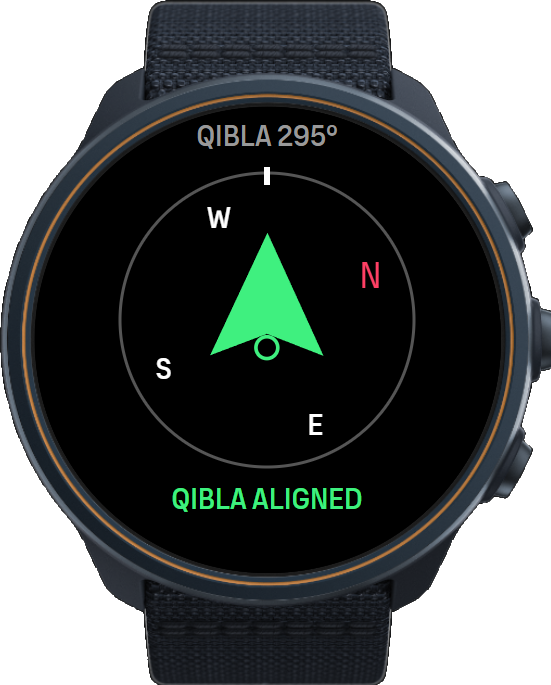
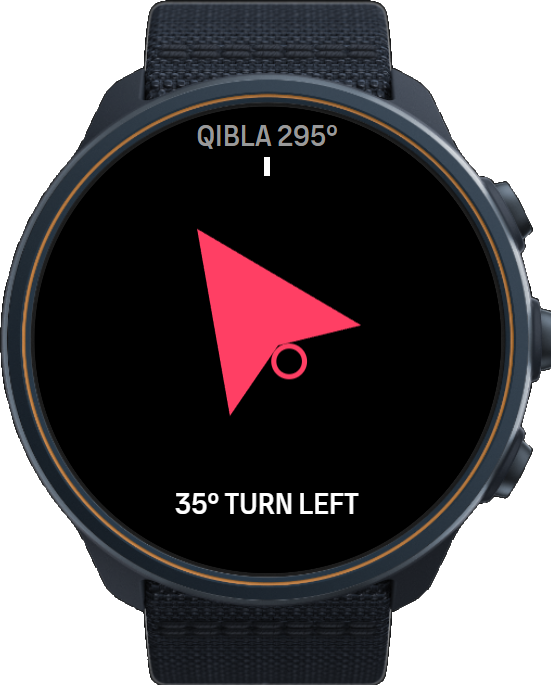
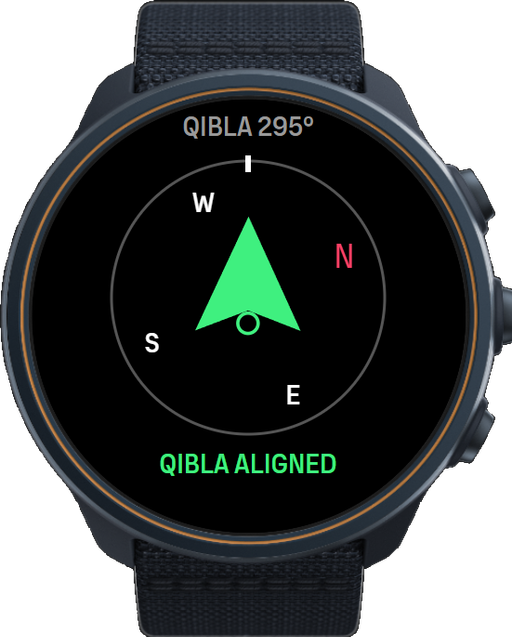
To show it can be done, I wrote it myself as a SuuntoPlus app for the Race S. A red arrow turns with you, and when you face Qibla within 3 degrees it goes green and the watch vibrates once. It works offline. I have only tested it on the Race S.
Where I got stuck:
- It is not in the SuuntoPlus Store, so installing it means VS Code, the SuuntoPlus Editor extension and a Bluetooth 4.0+ adapter on a computer. Almost nobody will do that.
- When the watch syncs with the Suunto app or SuuntoLink, the app is removed. To keep it, I have to keep the watch unpaired from my phone, which also means no workout sync.
- SuuntoPlus apps only run during an exercise, so I made a custom sport mode called “Kiblat” and start/stop it just to read the direction. It works, but it is a clumsy way to check a compass bearing.
What I’m asking for, in order of preference:
- A built-in Qibla (or “bearing to a saved point”) screen on the compass.
- Or a clear path to publish an app like this in the SuuntoPlus Store.
- Either way, a way to keep developer-installed SuuntoPlus apps after a sync.
You can try the same formula and screen in your browser, using your phone’s location and compass: https://qibla.xhtml.id/
Source code (MIT license): https://github.com/xhtml-id/suunto-qibla-compassI’m happy to hand over the code or help test if anyone at Suunto wants to look at it. Thanks for reading.
-
I isazi moved this topic from Suunto Race S
-
@ahmadnajiullah you can publish apps yourself in the S+ store, after joining the Suunto developer program [1]. This way the app will stay on your watch, and could also be installed by others.
-
@ahmadnajiullah detto:
What I’m asking for, in order of preference:- A built-in Qibla (or “bearing to a saved point”) screen on the compass.
Within an activity or from the map widget, this is already possible. Just save the coordinates as a PDI and sync to the watch. Then start an activity or open the map widget and choose Navigation>PDI>your saved PDI.
You will see an arrow on the map pointing to your saved coordinates. -
@ahmadnajiullah you can publish apps yourself in the S+ store, after joining the Suunto developer program [1]. This way the app will stay on your watch, and could also be installed by others.
@isazi thanks, I did not know I could publish it myself. I’ll apply to the developer program and submit it to the S+ store. That solves the “app disappears after sync” problem, and it means other people can install it without VS Code. If there is anything I should know before submitting (review time, rules for apps like this), I’d be glad to hear it.
@ahmadnajiullah detto:
What I’m asking for, in order of preference:- A built-in Qibla (or “bearing to a saved point”) screen on the compass.
Within an activity or from the map widget, this is already possible. Just save the coordinates as a PDI and sync to the watch. Then start an activity or open the map widget and choose Navigation>PDI>your saved PDI.
You will see an arrow on the map pointing to your saved coordinates.@SergioB thanks, the PDI trick works and I’ll keep it as a backup. The Kaaba as a saved point is a good idea. The difference for me is what the watch shows while you do it. The map arrow needs the map screen and a running activity, and it points at the point on the map. The app shows only the bearing and tells you how many degrees to turn, then goes green and vibrates when you face it. That is easier to read with a quick glance before prayer. But for people who just want something that works today, the PDI method is a fine answer.
Hello! It looks like you're interested in this conversation, but you don't have an account yet.
Getting fed up of having to scroll through the same posts each visit? When you register for an account, you'll always come back to exactly where you were before, and choose to be notified of new replies (either via email, or push notification). You'll also be able to save bookmarks and upvote posts to show your appreciation to other community members.
With your input, this post could be even better 💗
Register Login