Suunto app Forum Suunto Community Forum
    • Recent
    • Tags
    • Popular
    • Register
    • Login

    oCycler - FTMS bike link: power & cadence

    Scheduled Pinned Locked Moved SuuntoPlus™ Sports Apps
    29 Posts 10 Posters 3.1k Views 10 Watching
    Loading More Posts
    • Oldest to Newest
    • Newest to Oldest
    • Most Votes
    Reply
    • Reply as topic
    Log in to reply
    This topic has been deleted. Only users with topic management privileges can see it.
    • O
      oleksandr
      last edited by oleksandr

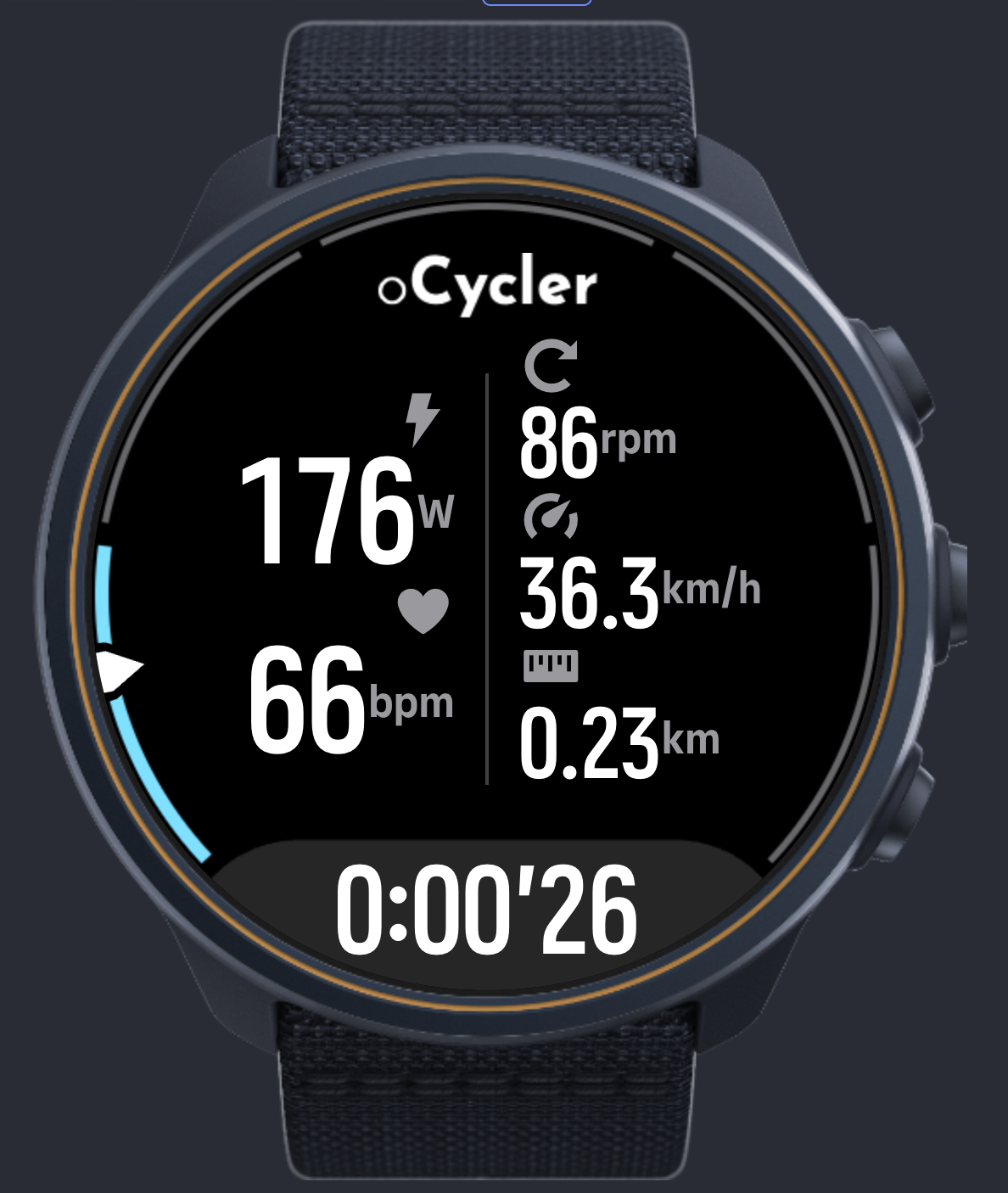
      Hello suunto community, my Indoor Cycle Bluetooth FTMS link app has been published this morning.
      oCycler.png

      The app connects to the bike automatically, shows the data in real time and records it as the data points in the workout summary.

      The app is currently tested and works well with Kettler HOI bike family, and theoretically should support other FTMS indoor bikes as well as Kettler follows the standard pretty closely.

      I’m looking forward to add the new features and fix any issues with the other bikes. Please don’t hesitate to leave any feedback, bug reports or feature request here or through the feedback form in suuntoplus app listing

      Watch: Suunto Race 2
      SuuntoPlus:
      oSpotter - Workout tracker
      oCycler - Indoor cycle FTMS Link
      oTicker - Checklist

      S K 2 Replies Last reply
      Reply Quote 8
      • S
        Stavrogin @oleksandr
        last edited by

        @oleksandr Can I use this with my ERG trainer like Jet Black Victory?

        I love the two apps you have created. How does this work with TSS? Will it be able to use the recorded power/watts from the trainer to assign a TSS or does it still use HR?

        Thanks and sorry if this has already been answered.

        Suunto Vertical, Race, Race 2, Race S and Run. Rocking the Vertical 2 Titanium at the moment.
        Garmin: Fenix 7X, Epix Pro 51mm, Forerunner 265, Fenix 8 51mm
        Coros: Pace Pro, Apex 4

        ravenR O 2 Replies Last reply
        Reply Quote 0
        • ravenR
          raven Bronze Member @Stavrogin
          last edited by raven

          @Stavrogin said:

          @oleksandr Can I use this with my ERG trainer like Jet Black Victory?

          I love the two apps you have created. How does this work with TSS? Will it be able to use the recorded power/watts from the trainer to assign a TSS or does it still use HR?

          Thanks and sorry if this has already been answered.

          Most cycling trainers like the Victory should broadcast bluetooth CPS (Cycling Power Sensor) which modern Suunto watches can connect to naturally. FTMS (FiTness Machine Service) is an alternative protocol that trainers also do, however most “spin bikes” only do FTMS and not CPS. You can get power data by FTMS but spin bikes typically are only estimating it and aren’t a proper power meter.

          If using this FTMS app, I doubt Suunto’s internal TSS analysis will use power when it is coming as an extended field from a Suunto+ app so you’d need to manually assign the TSS score if you want it to be power based, but I may be guessing wrong here. However, a more “natural” CPS connection Suunto can assign TSS based on power. I do this connecting my race S to my Stages power meter.

          S 1 Reply Last reply
          Reply Quote 0
          • K
            KSGravelJunkie @oleksandr
            last edited by

            @oleksandr I love the idea of this and something that I have been wanting for awhile. The only quirk in my 10 minutes tinkering with it, the watch will not allow me to connect with the trainer for my main data pages at the same time as using the app. I can either get the trainer data to just the app or just the basic Suunto data pages. In other words, when the app is running I cannot also connect a power meter (the power meter being my trainer) to the watch at the same time for my main Suunto data pages. Consequently, I can’t view the other pieces of data I like to see from my trainer (like average watts, average cadence, I assume recovery time and calories burned will be affected as well if those use power readings). It also probably makes it so I can’t use my other favorite training peaks app which tracks IF, NP, and TSS.

            I’m not sure if this is a bug in the app or a limitation of the watch software. If it’s a limitation of the watch software, is it possible to add more data fields to the app? At a minimum average watts? I really would like IF and NP as well.

            BTW, I have a Kickr Bike V2. It was not connected to anything else when I was tinkering, just to the watch. And the Kickr Bike can connect up to 3 devices at once so it’s not a limitation of the bike (or shouldn’t be).

            Great work! I look forward to tinkering with it some more and using it full time. Thanks!

            1 Reply Last reply
            Reply Quote 0
            • S
              Stavrogin @raven
              last edited by

              @raven Unfortunately the power portion of the Jetblack BT does not work on my Suunto V2. That is why I am asking. It only sees Cadence and something else (it has been a minute sorry) I had to connect my assiomo pedals to get power to the Suunto. So I was hoping…

              Suunto Vertical, Race, Race 2, Race S and Run. Rocking the Vertical 2 Titanium at the moment.
              Garmin: Fenix 7X, Epix Pro 51mm, Forerunner 265, Fenix 8 51mm
              Coros: Pace Pro, Apex 4

              O 1 Reply Last reply
              Reply Quote 0
              • Frederick RochetteF
                Frederick Rochette Bronze Member
                last edited by

                IMG_2493.jpeg
                Doesn’t work with my bike. Could you fixed it?

                O 1 Reply Last reply
                Reply Quote 0
                • O
                  oleksandr @Frederick Rochette
                  last edited by

                  @Frederick-Rochette I surely can try, from what I’ve seen so far this bike is slightly problematic. I will need some bluetooth data dump to make it work.
                  https://forums.zwift.com/t/horizon-cr7-slow-after-zwift-new-app/583685/2
                  Could you please drop me a message to the email address from the app description? I’ll let you know which data is needed and how to collect it. Alternative you can try using QZ app that would covert the signal to the proper FTMS

                  Watch: Suunto Race 2
                  SuuntoPlus:
                  oSpotter - Workout tracker
                  oCycler - Indoor cycle FTMS Link
                  oTicker - Checklist

                  1 Reply Last reply
                  Reply Quote 0
                  • O
                    oleksandr @Stavrogin
                    last edited by

                    @Stavrogin The way SuuntoPlus SDK is imlemented is a little limiting in that regard, developers can record into the custom data fields, but can’t overwrite the standard .fit fields like power or cadence, therefore no, unfortunately the TSS is still calculated through based on HR, and the ftms collected data is simply recorded in the workout summary using the custom fields.

                    Saying that, I already reached the Suunto partners contact, asking whether there are any ways to bypass that limitation, as I would like to have the proper power based TSS calculations myself.

                    I’ll keep you guys posted

                    Watch: Suunto Race 2
                    SuuntoPlus:
                    oSpotter - Workout tracker
                    oCycler - Indoor cycle FTMS Link
                    oTicker - Checklist

                    1 Reply Last reply
                    Reply Quote 0
                    • O
                      oleksandr @Stavrogin
                      last edited by

                      @Stavrogin said:

                      Jetblack BT

                      Maybe the power is just streamed using non-standard signature, please email me at the email listed in the app description. We can try to debug that and make a custom fix for your bike if it’s possible

                      Watch: Suunto Race 2
                      SuuntoPlus:
                      oSpotter - Workout tracker
                      oCycler - Indoor cycle FTMS Link
                      oTicker - Checklist

                      1 Reply Last reply
                      Reply Quote 0
                      • O
                        oleksandr
                        last edited by

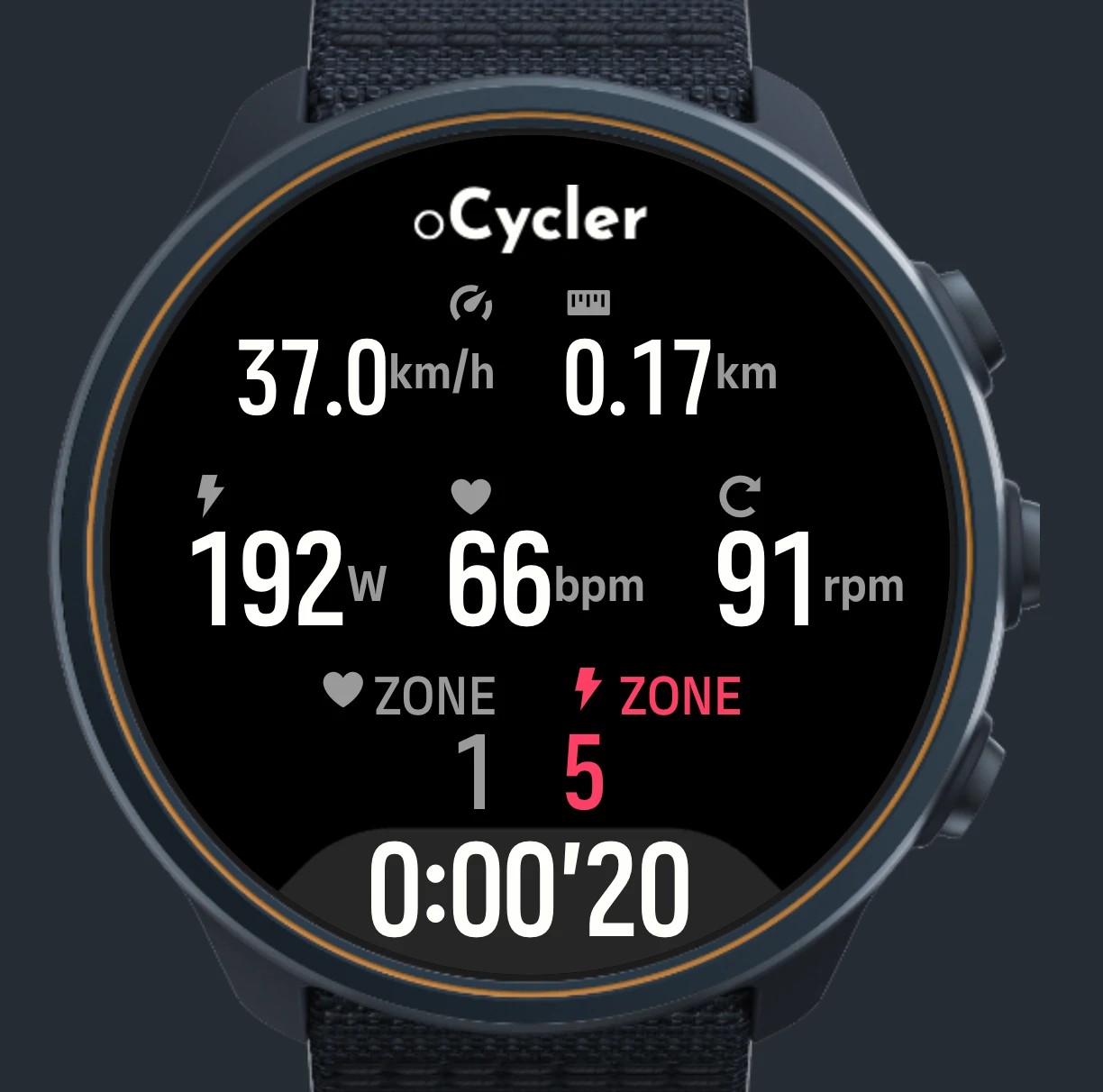
                        Future update, altough probably delayed as I can’t access my SuuntoPartner account for some reason
                        aec7e70c-14c0-42b5-9c2a-fc6fd55a5b7e-image.jpeg

                        Watch: Suunto Race 2
                        SuuntoPlus:
                        oSpotter - Workout tracker
                        oCycler - Indoor cycle FTMS Link
                        oTicker - Checklist

                        K 1 Reply Last reply
                        Reply Quote 1
                        • K
                          KSGravelJunkie @oleksandr
                          last edited by

                          @oleksandr One thing I failed to mention in my first post, I completed a full session of testing it and it recorded my speed, power, and cadence throughout the 1 hour ride but failed to record my distance (read 0 miles throughout and 0 in the workout summary). This is on my kickr bike V2. Is this a known bug/issue you’ve seen? Any fix for it?

                          O J 2 Replies Last reply
                          Reply Quote 0
                          • O
                            oleksandr @KSGravelJunkie
                            last edited by

                            @KSGravelJunkie I’ll probably require a fix tailored to your bike specifically. Drop me an email to the address provided in the app description

                            Watch: Suunto Race 2
                            SuuntoPlus:
                            oSpotter - Workout tracker
                            oCycler - Indoor cycle FTMS Link
                            oTicker - Checklist

                            1 Reply Last reply
                            Reply Quote 0
                            • J
                              johann.fuehrer Silver Members @KSGravelJunkie
                              last edited by

                              @KSGravelJunkie I ride virtually on MyWoosh on my KICKR and all metrics except the distance are recorded. I always have to edit the ride afterwards and add it manually from what I read in the application. But honestly I do not care as actually I did not move 🙂 and especially if I do some interval training the speed and distance shown there make often not realy sense to me (ERG mode thing, I believe) It’s the Watts which I’m interested in mainly…

                              “Trail running is the answer. Who cares what the question is …”

                              K 1 Reply Last reply
                              Reply Quote 0
                              • K
                                KSGravelJunkie @johann.fuehrer
                                last edited by KSGravelJunkie

                                @johann.fuehrer Thanks for the feedback! Glad I’m not the only one.

                                @oleksandr do you need a fit file? maybe I can try again and email it to you?

                                O 1 Reply Last reply
                                Reply Quote 0
                                • O
                                  oleksandr @KSGravelJunkie
                                  last edited by

                                  @KSGravelJunkie I’ll need the specific protocol recording (the data that the bike streams in real time, email me and I’ll send the tutorial on how to record that

                                  Watch: Suunto Race 2
                                  SuuntoPlus:
                                  oSpotter - Workout tracker
                                  oCycler - Indoor cycle FTMS Link
                                  oTicker - Checklist

                                  P 1 Reply Last reply
                                  Reply Quote 0
                                  • O
                                    oleksandr
                                    last edited by

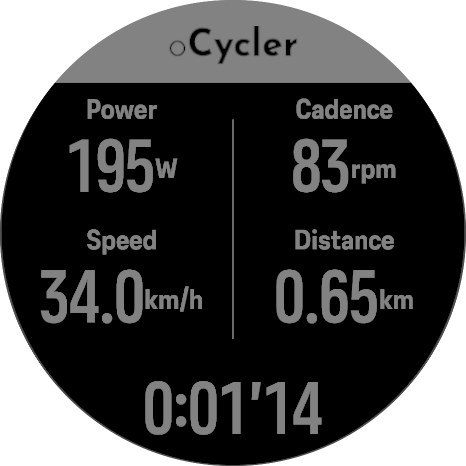
                                    Hello guys, please welcome v2 with the new mode

                                    The new power mode with color coded power, more actionable
                                    And the classic one, that resembles the structure of the v1, but redesigned

                                    Also the HR gauge is added to views

                                    Hold down (bottom) button to switch between the modes
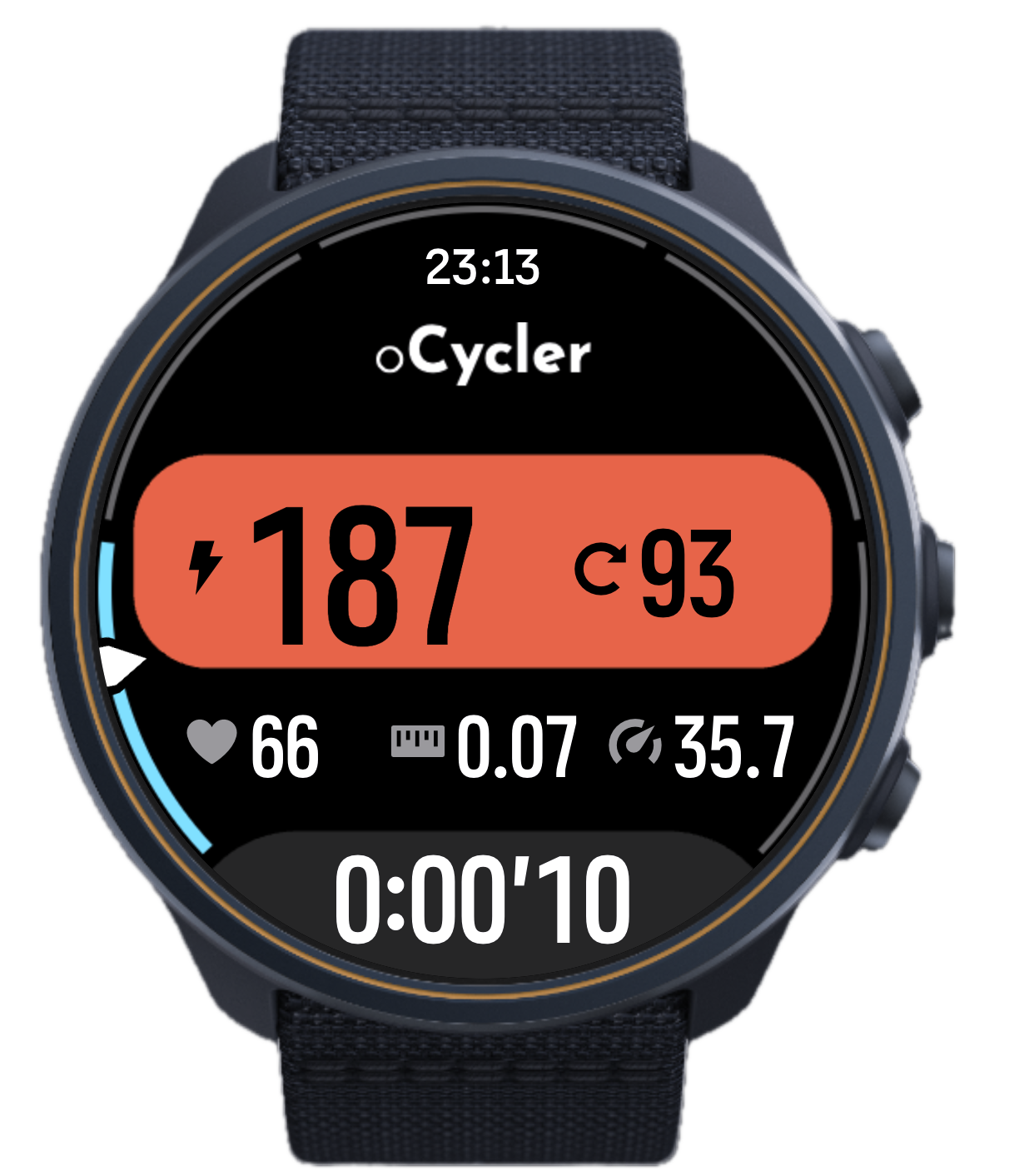
                                    Screenshot 2026-09-28 at 23.13.13.png Screenshot 2026-09-28 at 23.13.30.png

                                    Watch: Suunto Race 2
                                    SuuntoPlus:
                                    oSpotter - Workout tracker
                                    oCycler - Indoor cycle FTMS Link
                                    oTicker - Checklist

                                    1 Reply Last reply
                                    Reply Quote 1
                                    • P
                                      PacoHdez @oleksandr
                                      last edited by

                                      @oleksandr
                                      Hi,

                                      I’m using oCycler with a Suunto Race and Zwift Hub.

                                      During a 30-minute indoor cycling session, power, speed and cadence were all displayed correctly in real time.

                                      However, after syncing with Suunto App, distance was 0.00 km and average cadence was incorrectly recorded as 1 rpm.

                                      Power data was recorded correctly.

                                      Could you please look into these issues?

                                      Thanks!

                                      @oleksandr

                                      O 1 Reply Last reply
                                      Reply Quote 1
                                      • O
                                        oleksandr @PacoHdez
                                        last edited by

                                        @PacoHdez could you please send me the .fit file of that workout to the email specified in the app description?

                                        Watch: Suunto Race 2
                                        SuuntoPlus:
                                        oSpotter - Workout tracker
                                        oCycler - Indoor cycle FTMS Link
                                        oTicker - Checklist

                                        P 1 Reply Last reply
                                        Reply Quote 0
                                        • P
                                          PacoHdez @oleksandr
                                          last edited by

                                          @oleksandr
                                          Hi
                                          Sent

                                          @oleksandr

                                          MarynM 1 Reply Last reply
                                          Reply Quote 0
                                          • MarynM
                                            Maryn Silver Members @PacoHdez
                                            last edited by

                                            @oleksandr First of all, thank you very much for the app. The app shows that it is possible to connect Suunto watches to BT FTMS devices.

                                            Yesterday I have done a 2 minute short test. My setup is: Decathlon V500 V2 indoor trainer (Ant+, 2x BT). The Garmin Edge 530 controls the trainer via Ant+. Suuunto Race 2
                                            I set the power to 160W for testing (Edge set to 160W). While riding, I connected my watch using the oCycler app. The watch connected and began displaying power and other metrics correctly.
                                            At that point, the Garmin Edge lost the ability to control the trainer. Changing the power to a different value had no effect; the trainer remained locked at 160W.
                                            I have a few questions
                                            I’m wondering if this is an issue with the app or the trainer itself?
                                            Is it possible to update the app to add the ability to control power directly from the watch?
                                            Is it possible for the Suunto app to read power (say, natively) in a way that calculates the TSS power value?
                                            The oCycler app generally allows you to read power through the watch. When I try to pair the Race 2 directly with the trainer, the watch only detects cadence and speed.


                                            Suunto Race 2, Edge 530, Suunto Wings, Polar H10&Verity Sense, Suunto Smart Belt

                                            O 1 Reply Last reply
                                            Reply Quote 0

                                            Hello! It looks like you're interested in this conversation, but you don't have an account yet.

                                            Getting fed up of having to scroll through the same posts each visit? When you register for an account, you'll always come back to exactly where you were before, and choose to be notified of new replies (either via email, or push notification). You'll also be able to save bookmarks and upvote posts to show your appreciation to other community members.

                                            With your input, this post could be even better 💗

                                            Register Login
                                            • First post
                                              Last post

                                            Suunto Terms | Privacy Policy