Subcategories

  • Large screen adventure watch for outdoor expeditions and training V2

    45 Topics
    827 Posts
    runomaticR
    @jannis That’s a pretty generalised view you’re posting about the Suunto. As I mentioned above, it works for me – just as accurately as it did with my Garmin Epix back then. And I ask myself: what’s wrong with resources rising again during the day, even if I don’t take a nap? When I’m sitting relaxed on the sofa, it’s definitely restorative.
  • Ultimate performance watch for racing and training V2

    128 Topics
    1k Posts
    Stoke80S
    @Egika Yes, I know and I am sorry for that. But as this is a specific thread for this topic only, I thought I will continue here. I will try to remember when I go skiing the next. Time. Due to the current weather in my area (rain up to 2000 meters and freaking warm), please give me some time
  • Large screen adventure watch for outdoor expeditions and training.

    960 Topics
    14k Posts
    A
    @vinc14 in my case, rebooting my phone helps, at least for a while, see also here Obviously that’s not a solution.
  • Ultimate performance watch for racing and training.

    791 Topics
    8k Posts
    JosaipluJ
    @sky-runner Touch on map only in definiitevely the best option for me also with a way to turn touch on/off globally in a quick menu, upvoted This will also avoid turning off an morning alarm by unwanted screen touch btw
  • Light and compact but ultimate performance watch for racing and training.

    393 Topics
    3k Posts
    H
    @Brad_Olwin As I said in my original post this wasn’t the issue. This issue fixed itself and I am now able to see zonesense data on the watch and in the app, and I am not sure but believe one of the 2 following things fixed it: HRM 200 version updated to 5.40 Looking at the HRM 200 manual (Manual) I realized the device have 2 connection types: secure and open. Secure is when the device blinks green twice and open when it blinks green three times. I am not sure what was the connection type when I originally tried to make it work, but when trying again after opening this thread I made sure to use the open connection state. My hypothesis is that one of the two fixed my issue. Leaving this for future reference and future google searches, as when I searched this I didn’t find anything related.
  • Suunto 9 Peak Pro

    413 Topics
    6k Posts
    D
    @pilleus Interesting that it has happened twice to you. Unfortunately re-syncing with SA hasn’t helped me. I think that’s due to my older software version, though.
  • Lightweight sports watch designed for runners

    112 Topics
    1k Posts
    Hari SeldonH
    Hi, I’m having issues again with HR data not being recorded in the last part of the activity. There have now been consecutive updates all at the same time, so it is difficult to understand why the problem has occurred again. I’ve updated the Polar H10 to latest fw, 4.1.10 I’ve updated SA to 6.5.7 (Android) I’ve updated the Run to 3.22.24 [image: 1765211731887-run.png]
  • Suunto 9 Peak

    444 Topics
    6k Posts
    W
    @francesco-boschini On the latest firmware 2.26.8 the actual height appears in mountain biking (trial) only on the second display in the middle left side and the total ascent appears in the upper right side. In normal cycling exercise there is no actual height displayed only total ascent. If you use a predefined route in navigation mode, then you have the actual height displayed as graph in a separate display.
  • Suunto 9

    1k Topics
    15k Posts
    sartoricS
    @Heidi What’s the other post ?
  • Suunto’s first smart-with WearOS

    677 Topics
    10k Posts
    I
    @ryhoage Same issue here, in my case MIUI 13 on Android 12. The phone reboot when bluetooth is disabled. I understand if it were a crash or something similar, but reboot the phone is a serious issue that must be fixed.
  • Suunto 5 Peak

    60 Topics
    714 Posts
    Tomas5T
    Hello, today we noticed this issue on my wifes 5 Peak. Unfortunatelly it has already 2.5 year so it is not under warranty anymore. And she is light user, and not wearing it while washing dishes, showering, sleeping etc. Only around 9hours a day during working days only and then while cycling/hiking but thats few times a month. [image: 1753289160907-img_0635.jpeg]
  • All Suunto Spartan Series

    328 Topics
    3k Posts
    S
    Good day, I have a Suunto Spartan Ultra and have had it for 8 years. From my last Samsung UI update my watch has not synced my daily steps with the Suunto app. I have tried the following but not success: Restart phone and watch. Reinstall Suunto App Force stop Suunto App Unpair watch from phones Bluetooth and reconnect. Gave all items on Suunto App permission. Made sure Suunto APP and phone is not on energy saving mode. If anyone has a solution please assist. Kind regards
  • Ambit 1,2,3 Series

    282 Topics
    3k Posts
    R
    Hello, lately I heard some “click-clack” from inside my Ambit-3. I opened it and saw that the GPS antenna was broken. A few days before I opened my son’s Ambit-2 Peak as its battery is nearly dead and I wanted to look for the battery’s specs. So I switched the Ambit-2’s gps antenna to the Ambit-3. But now the Ambit-3 runs into errors (looping into “Connect to Moveslink”). Rollback to the broken antenna fixes that. The antenna is labeled as a Partron ANPP1585F4ZSA, which can also be seen on https://fccid.io/RYP23391/Internal-Photos/Internal-photos-2371063 But I wasn’t able to find anything about that in www. Does anybody here has an idea where to find/buy the antenna? Regards, Chris
  • Suunto 5

    215 Topics
    2k Posts
    A
    I haven’t used my D5 since January; I got it out of the cupboard today to charge it as it’s dead, but I can’t remember how to attach the charger. I’ve searched the manual but it just says ‘attach’, it doesn’t explain how. There’s a red thing on the end of the cable which I seem to recall ‘snaps’ onto the watch, but right now it’s not snapping onto anything - it doesn’t stick to the back of the watch like I seem to remember. Have I got this totally wrong? Please can someone explain in simple terms how to attach the charger?! Thanks
  • Suunto 3 and Suunto 3 Fitness

    56 Topics
    551 Posts
    P
    Hei Expert Users, I am using SUUNTO AMBIT3 PEAK device, do we have options to set the training plan in the device?
  • Traverse Series

    75 Topics
    447 Posts
    No new posts.
  • Software Update 2.48.16 (2025 November Rain release)

    Pinned
    456
    37 Votes
    456 Posts
    29k Views
    Horizontal_2H
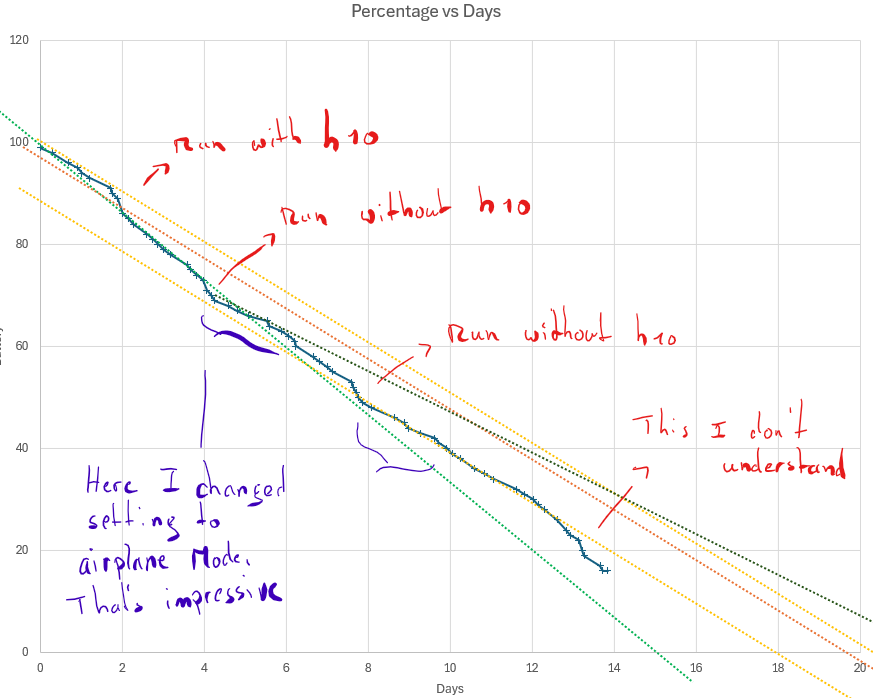
    @gkaempfer Hi! Amazing data! I suppose this is good . I made a thread to harvest all battery data. Hopefully we’ll see usefull patterns. Are you using an external HRM like the H10, by the way? https://forum.suunto.com/topic/14214/battery-drain
  • What sport mode is missing from our watches in your opinion?

    Pinned
    193
    4 Votes
    193 Posts
    39k Views
    F
    @Dimitrios-Kanellopoulos if it’s not too late… > Agility would also be great. I would even think that having two different GPS tracks simultaneously recorded (one for the dog and one for the runner) would be incredible (just dreaming… or maybe an actual business opportunity ).
  • Firmware Collection

    Pinned
    106
    19 Votes
    106 Posts
    24k Views
    N
    @Squirrel Yes, it did get an location fix, it has the location correct. Will try with a small hike later this afternoon.
  • Battery drain

    5
    1
    0 Votes
    5 Posts
    245 Views
    G
    Posting my experience here too. I continue to monitor in my next charging cycle. I have a feeling that the slight drainage increase that I experienced in the last day or so of the previous cycle continues but too early to tell for sure. Here is my recent battery experience with my Vertical 2. Over the past 14 days (and a bit) I managed to do 19.5 GPS+HR activities and drain 91% of my battery. I built a simple prediction model for battery drainage rate assuming that there are three different drainage rates: During GPS+HR activity (running and cycling in my case), during sleep (DND) and while idle (with notifications and raise to wake variations). Under these assumptions I tried to approximate the drainage model as close as possible to the battery levels and activity times I recorded during the day and came up with the following numbers (they imply slightly less than 5% per day without activities and more than the spec 65 GPS hours): Sleep tracking rate: 0.11%/h Non activity rate: 0.25%/h GPS Activity rate: 1.16%/h Flashlight rate: 20%/h The above model worked very well during most of the two weeks until the last day or so when the battery got to about 20%. From that point it seems to drain faster than my model allowed. In fact, until that point, the model showed about 1.07% drainage per GPS hour which I updated to the higher number above to compensate for the end. Settings: AOD OFF Raise to wake: Display only 247 HRM Notifications ON No external BT connections except Android Suunto App (6.4.7) Wireless OFF BT discovery OFF Brightness LOW DND from 22:00-5:40 Sleep tracking on with HRM but without SPO2 NO USE OF FLASHLIGHT [image: 1765122476069-pasted-image.png]
  • Best stable Fimware

    6
    0 Votes
    6 Posts
    293 Views
    VoiGASV
    Ok, thank you for the feedback! Then I reduce my question to Bike Pod (no readings) and Power drops ( dropping to zero during the run). I don’t get values from a bike pod with Vertical and RaceS with current firmware. Did a restore of 2.44 on the RaceS - also didn’t help. So three samples in total and I am not the only one. Pod works with Garmin 910xt, Garmin 235, Laptop (ANT+ stick) and Suunto Ambit3 Vertical. And the Power Drops to Zero - I had them on every Run until it was resolved with 2.44. Also this was a common problem in 2.43 I think. Maybe a 2.39 could solve both issues? Its Hometrainer weather in Austria and I want to use the Pod…
  • Elite Home Trainer with Misuro Sensor

    2
    0 Votes
    2 Posts
    160 Views
    VoiGASV
    I buyed it to try and unfortunatly I can answer the question. It doesn’t work with Suunto - but with Garmin 🤮 The Sensor connects via Bluetooth, but delivers no readings. On Garmin with ANT everything works out of the box
  • Whats up with Ressourcen Widget and its numbers

    Moved
    1
    0 Votes
    1 Posts
    123 Views
    No one has replied
  • SWEREF 99 TM

    Moved
    1
    0 Votes
    1 Posts
    78 Views
    No one has replied
  • Map Rendering and Trail Visibility after Software Update 2.43.8/.12

    39
    3
    6 Votes
    39 Posts
    5k Views
    sorinusS
    I had the chance to experience this issue recently. Was running in the woods, fog all around, and pulled the maps to double check the trails. Zoom over 200 meters and trails dissapear, useless really, I had to pull out the phone maps. I hope it gets fixed.
  • Measuring power while running

    18
    0 Votes
    18 Posts
    3k Views
    VoiGASV
    @docsport77 Power doesn’t work if you choose the treadmill activity, but you can use a Running activity and deactivate GPS. Not very accurate I think, but it works
  • Custom Alarms

    Moved
    1
    3 Votes
    1 Posts
    92 Views
    No one has replied
  • Rest until lap button pressed on intervals

    Moved
    9
    1 Votes
    9 Posts
    855 Views
    Anthony GuillemetteA
    @aiv4r I’m talking about configuring it directly from the watch. But setting a very long rest time is so simple that I didn’t even think of this workaround ^^ Thank you
  • Specify intensity zones for sport profile

    1
    0 Votes
    1 Posts
    80 Views
    No one has replied
  • Heart rate has dropped after a run

    Moved
    1
    0 Votes
    1 Posts
    78 Views
    No one has replied
  • Notification sounds only during trainings

    Moved
    7
    4 Votes
    7 Posts
    760 Views
    Anthony GuillemetteA
    @Mff73 Few months later, it still not available
  • Disable autolap notification during intervals

    Moved
    6
    1 Votes
    6 Posts
    732 Views
    Anthony GuillemetteA
    My initial need is not really relevant anymore. @Egika said in Disable autolap notification during intervals: activating and de-activating autolaps will be possible with Suunto S9PP, Race, Vertical soon. But I still can’t find it anywhere. And it would be really useful to enable it manually during a session. A typical example : I start a run with the wrong sport mode, the one without autolap. After a few kilometers, I realised it and want to turn autolap on… but I couldn’t, unless I switched to another sport mode - which would split my workout into two separate activities.
  • Globally Turn "Feeling" Setting ON/OFF for All Activities

    Moved
    7
    7 Votes
    7 Posts
    600 Views
    Z
    @omurray I agree. Feeling is so subjective that is skews the Recovery Metric. If my sleep and HRV are poor but my feeling after activity thew day before was very good then it reports I am ready to train. However, that morning I feel exhausted! I will skip Feeling in future to try to force the algorithm to just use HRV, Sleep and Training Load and Fatigue
  • Software Update 2.44.52 (2025 Q3 - HOTFIX)

    Locked
    197
    18 Votes
    197 Posts
    24k Views
    cosme.costaC
    @enriqueescoms I do not know, but I guess that yes. All I’m writing here is what I can understand reading the Spanish forum. There, it has been said that a hotfix is coming with some new features and that is not Q4 update.
  • 3 Votes
    14 Posts
    1k Views
    sky-runnerS
    @fritzbt2013 said in Climb guidance 2.0 issue - not all zoom levels are available at the end of the route (see picture): I agree with the suggested changes, but they should put waypoint name where distance is Great idea about the waypoint name! The time is completely redundant on this screen!
  • 0 Votes
    2 Posts
    133 Views
    SquirrelS
    Well thought out and reasonable suggestions for improvement, as usual. I would also suggest an option to display intensity zones ring/gauge on the map screen, just as it is displayed on other data pages. It would be very helpful to have it even without the corresponding numerical data field. This way, users could stay on the map page all the time without switching back and fort to check the intensity. 🥵

Suunto Terms | Privacy Policy