Subcategories

  • Large screen adventure watch for outdoor expeditions and training V2

    43 Topics
    750 Posts
    SquirrelS
    @sky-runner said in Vertical 2 during 14.5 hour long ultra: If it is vector based it should be relatively easy to make the level of details optional for those users who really need it. Exactly! Someone getting an idea to hide trails at 500m and above is weird enough, but that the idea actually makes it all the way to production firmware, unchallenged, is quite shocking.
  • Ultimate performance watch for racing and training V2

    119 Topics
    1k Posts
    amko34A
    The Race 2 is my first Smart/Sports watch and I am quite happy I got a titanium version on a good bargain second hand and I like the look and feel (although I like the bezel of the Vertical or Race1 more). I am on my 10th day and the battery is at 25% with 24/7 HR measurement, sleep tracking and wake-on-rise with only display showing. So far in my 10 days I had 2 GPS activities and 4 non-GPS activities logged. I don’t know exactly if the battery life statement of 18 days includes logged trainings but I cant imagine how to reach 18 days but lets see still happy with the battery. I think the crown moves too easily and would wish for more haptic feedback. Sleep tracking seems to be quite good, although it misses sometimes some short awake times. I really love the screen and UI
  • Large screen adventure watch for outdoor expeditions and training.

    957 Topics
    14k Posts
    S
    Today I ran “out and back”. At the end of “out” I stopped for 40 minutes. I paused the activity, to save the battery I switched the battery mode to Tour mode. After the stop I switched the battery mode back to Endurance mode and ran back. All data off the activity is correct: Distance, Times, Elevation profile, Pace etc. But the gps track shows the “out” part only, not the “back” part. [image: 1764599561823-93cb5ab4-cf43-430a-a37b-035142b17520-image.png]
  • Ultimate performance watch for racing and training.

    790 Topics
    8k Posts
    VoiGASV
    Also nothing from my (Elite Misuro) bikepod with November Rain Firmware. Should this be fixed with the current version?
  • Light and compact but ultimate performance watch for racing and training.

    391 Topics
    3k Posts
    A
    @Elvis-Tavarez Hi I’m trying some plannings with the coach AI , and I have the same trouble that you. Suunto Coah it’s very simple, most of the plans don’t specify the intervals, recoveries, warm up time etc. in the calendar. So then in the Race watch is worst, you need to plan manually. I think that Suunto need more work over trainning plans, competence like Garmin or Coros plan you the series including rythm based on your goals etc , and you don’t need to do anything on the watch. Albert

  • Suunto 9 Peak Pro

    411 Topics
    6k Posts
    P
    @pavel.samokha thanks!
  • Lightweight sports watch designed for runners

    109 Topics
    1k Posts
    Brad_OlwinB
    @zagazoo said in ZoneSense bug for Runs?: @Brad_Olwin Thanks Brad - I’m on IOS app and release version but so far only two test walks have displayed. ZS Can you provide an image of ZS working on your watch? You are sure the belt is connected and sending good data? I have not had a problem with this.
  • Suunto 9 Peak

    444 Topics
    6k Posts
    W
    @francesco-boschini On the latest firmware 2.26.8 the actual height appears in mountain biking (trial) only on the second display in the middle left side and the total ascent appears in the upper right side. In normal cycling exercise there is no actual height displayed only total ascent. If you use a predefined route in navigation mode, then you have the actual height displayed as graph in a separate display.
  • Suunto 9

    1k Topics
    15k Posts
    Thomas SakkasT
    Make the front-page interval running session reporting as it was at previous version of the app !!! I have a Suunto Baro 9 and when i see my running interval session at the app, the main features of this interval training doesn’t being reported anymore at the front page as it used. I ve done everything with the app the agent told me but nothing worked… Bring the old UI back please !!!
  • Suunto’s first smart-with WearOS

    677 Topics
    10k Posts
    Jakub BadinJ
    @ryhoage Same problem here - Moto g60 Android 12
  • Suunto 5 Peak

    60 Topics
    714 Posts
    Tomas5T
    Hello, today we noticed this issue on my wifes 5 Peak. Unfortunatelly it has already 2.5 year so it is not under warranty anymore. And she is light user, and not wearing it while washing dishes, showering, sleeping etc. Only around 9hours a day during working days only and then while cycling/hiking but thats few times a month. [image: 1753289160907-img_0635.jpeg]
  • All Suunto Spartan Series

    327 Topics
    3k Posts
    EgikaE
    @galopinouchet https://www.suunto.com/Support/Product-support/suunto_spartan_sport_wrist_hr/suunto_spartan_sport_wrist_hr/features/glonass/ https://www.suunto.com/Support/Product-support/suunto_spartan_sport_wrist_hr/suunto_spartan_sport_wrist_hr/features/gps-accuracy-and-power-saving/ Plus: “Whenever you navigate a route or a POI, the GPS accuracy is automatically set to Best.”
  • Ambit 1,2,3 Series

    282 Topics
    3k Posts
    R
    Hello, lately I heard some “click-clack” from inside my Ambit-3. I opened it and saw that the GPS antenna was broken. A few days before I opened my son’s Ambit-2 Peak as its battery is nearly dead and I wanted to look for the battery’s specs. So I switched the Ambit-2’s gps antenna to the Ambit-3. But now the Ambit-3 runs into errors (looping into “Connect to Moveslink”). Rollback to the broken antenna fixes that. The antenna is labeled as a Partron ANPP1585F4ZSA, which can also be seen on https://fccid.io/RYP23391/Internal-Photos/Internal-photos-2371063 But I wasn’t able to find anything about that in www. Does anybody here has an idea where to find/buy the antenna? Regards, Chris
  • Suunto 5

    215 Topics
    2k Posts
    A
    I haven’t used my D5 since January; I got it out of the cupboard today to charge it as it’s dead, but I can’t remember how to attach the charger. I’ve searched the manual but it just says ‘attach’, it doesn’t explain how. There’s a red thing on the end of the cable which I seem to recall ‘snaps’ onto the watch, but right now it’s not snapping onto anything - it doesn’t stick to the back of the watch like I seem to remember. Have I got this totally wrong? Please can someone explain in simple terms how to attach the charger?! Thanks
  • Suunto 3 and Suunto 3 Fitness

    56 Topics
    551 Posts
    P
    Hei Expert Users, I am using SUUNTO AMBIT3 PEAK device, do we have options to set the training plan in the device?
  • Traverse Series

    75 Topics
    447 Posts
    No new posts.
  • ZoneSense - reflections

    3
    4
    0 Votes
    3 Posts
    472 Views
    Adrian.SA
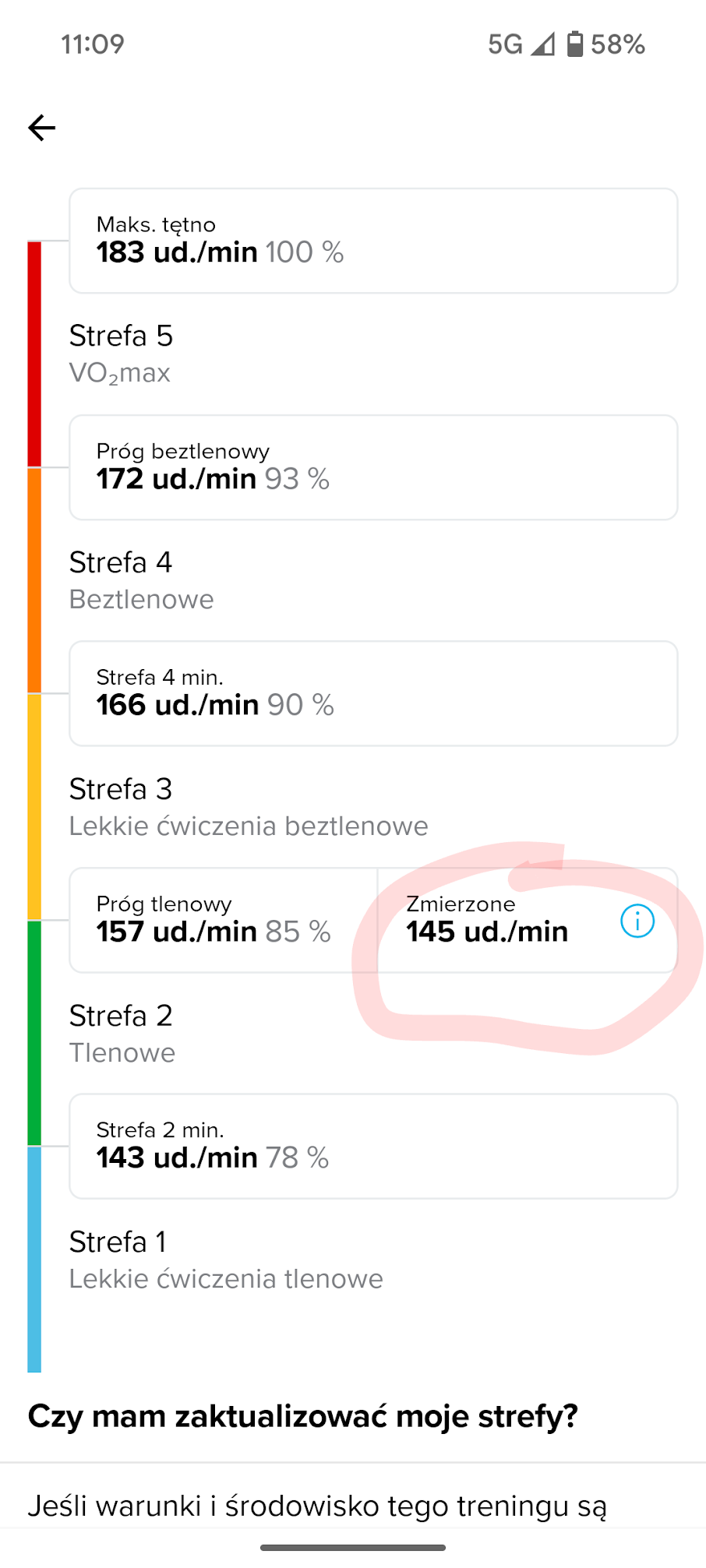
    The 145 is LT1, that is the upper limit of Z2 in the classic model. Maybe it wasn’t the best day. Thanks for the explanation Today, my heart rate was definitely 5-10 beats higher than last week, so this could be a good sign. I ran 5:0/km with a heart rate of 146-154 instead of the usual 135-142, so I immediately felt that today 5:0 was too fast for Z1/Z2. I’ll let you know after my next workouts. Regarding your intervals - 100m is too short for ZoneSense to be effectively used. It needs about 2 minutes to correspond to your conditions. OK With the top button you can cycle through 4 different screens of ZoneSense. One of them gives you HR and Pace, what I often use… Didn’t know, thanks!
  • Alarm Clock

    Moved
    33
    36 Votes
    33 Posts
    5k Views
    wzxecrW
    Yes they’ve probably have tons of requests like this. Will wait and cross fingers it is not low in their todo list
  • 19 Votes
    2 Posts
    307 Views
    inkognitoI
    Gentle reminder that this basic feature, which almost every GPS device has, is still missing in 2025…
  • Horrible customer service

    Locked
    2
    0 Votes
    2 Posts
    203 Views
    sartoricS
    There’s no need to open a new thread to reply. Please keep using the existing one. locking to avoid duplicates
  • Adding the Name of the Bluetooth with More Options

    1
    0 Votes
    1 Posts
    151 Views
    No one has replied
  • Rest Timer feature

    23
    4 Votes
    23 Posts
    2k Views
    Mff73M
    @sky-runner maybe a silly idea, but what about using multisport ? entering an aid station you switch to any mode you customized for “”“pause”“” at station, and switchback to main one when going out ? if times data are setup correctely, you can have total time and/or current activity time (run or pause time in you case), previous pause and previous “stats”, etc… and you will have all details in SA after.
  • POIs missing from watch map

    1
    4 Votes
    1 Posts
    161 Views
    No one has replied
  • Autopause too aggressive for slow or climbing activities

    Moved
    28
    16 Votes
    28 Posts
    2k Views
    Łukasz SzmigielŁ
    @Stefano-M64 use average speed in time windows, not just when it’s below 2 kmh. For 10 sec for example.
  • Black grid issue

    24
    10 Votes
    24 Posts
    4k Views
    N
    Black grid… 44.80489°N 20.37743°E
  • Disable heart rate monitor during the day

    Moved
    4
    2 Votes
    4 Posts
    319 Views
    JonasLarssonJ
    @2b2bff Ah, I missed the sleep part… sorry @Benjamin-DuPont
  • More pinned widgets

    Moved
    1
    0 Votes
    1 Posts
    167 Views
    No one has replied
  • Small (and larger) improvements

    Moved
    2
    2 Votes
    2 Posts
    495 Views
    brechtvbB
    There is a fixed widget when swiping left (so on the right) Perhaps add a fixed widget when swiping right (so on the left)
  • 2 Votes
    3 Posts
    297 Views
    FlamingoF
    @larrybbaker After posting this feature request yesterday I googled if this might already exist for suunto, because I knew that it exists for garmin (tried to find an image of it, but couldn’t find one). I found someone in this forum who suggested something similar for the suunto vertical and the user created a nice gif how it could look like: https://forum.suunto.com/topic/10057/current-heart-rate-on-the-map The information shouldn’t cover too much from the map, but some sorf of indicator could be at the edge of the screen.
  • Software Update 2.40.38 Cycling Navigation Workaround

    1
    2 Votes
    1 Posts
    258 Views
    No one has replied
  • Made in Finland

    9
    1
    5 Votes
    9 Posts
    1k Views
    GiPFELKiNDG
    @Jan-Suchánek have a suunto vertical customized ️
  • How to setup type of water on suunto Ocean

    3
    0 Votes
    3 Posts
    325 Views
    VoiGASV
    @BrunoH It should also calculate the depth a little bit different between sweet and salty. Not much, but still a feature other dive computers have
  • No touch screen on activities

    5
    0 Votes
    5 Posts
    302 Views
    S
    @safari ahh, thank you!!
  • Question about Adventure Racing sport mode

    7
    0 Votes
    7 Posts
    720 Views
    EgikaE
    @maszop garmin has a special AR mode, that allows recording but not much else. and basically it shows a time stamp since when this mode was enabled uninterruptedly. So it can be checked easily after the race.
  • Lock

    Moved
    2
    1 Votes
    2 Posts
    143 Views
    Dimitrios KanellopoulosD
    @chandan for most watches the option should be there
  • Will there be Q1 2025 update? I imagine so, right?

    23
    5 Votes
    23 Posts
    4k Views
    D
    Cables to the office this week.

Suunto Terms | Privacy Policy